> ## Documentation Index
> Fetch the complete documentation index at: https://sonamu.cartanova.ai/llms.txt
> Use this file to discover all available pages before exploring further.
# Installation
> Installing Sonamu and setting up the development environment
Sonamu allows you to easily start a project using the `create-sonamu` package.
## System Requirements
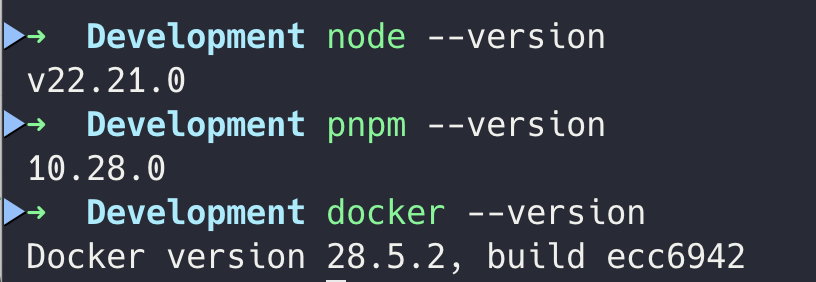
The following environment is required to use Sonamu:
* **Node.js** v22 or higher
* **pnpm** v10.23 or higher
* **Docker** (for running the database)
If pnpm is not installed, you can enable it with the `corepack enable` command.
 ## Creating a Project
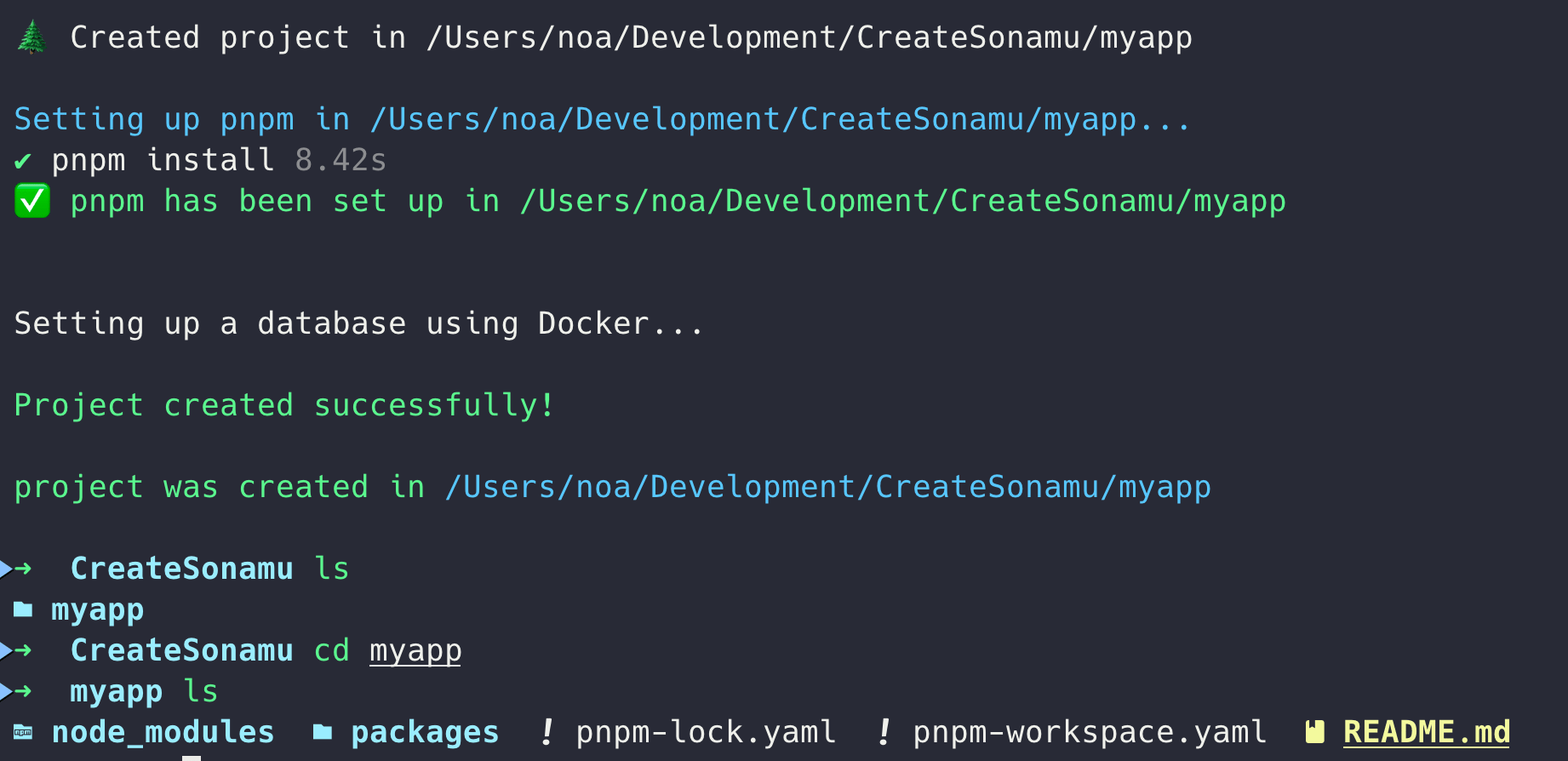
Run the following command in your terminal to create a new Sonamu project:
```bash theme={null}
pnpm create sonamu
```
### Inline Options
You can pass the project name as an argument or use options to skip interactive prompts:
```bash theme={null}
# Specify project name directly
pnpm create sonamu myapp
# Use all default options (non-interactive)
pnpm create sonamu myapp --yes
# Explicitly specify pnpm/docker setup
pnpm create sonamu myapp --pnpm y --docker y
# Auto-proceed with pnpm only (docker prompts will appear)
pnpm create sonamu myapp --pnpm y
# Auto-proceed with docker only (pnpm prompts will appear, DB options use defaults)
pnpm create sonamu myapp --docker y
# Fully non-interactive mode (all options specified)
pnpm create sonamu myapp \
--pnpm y \
--docker y \
--db-user=postgres \
--db-password=1234 \
--db-name=myapp \
--container-name=myapp-pg \
--docker-project=myapp-docker
# Specify DB options only (pnpm/docker setup will prompt)
pnpm create sonamu myapp --db-name myapp --db-password secret123
```
| Option | Description | Default |
| -------------------------------------- | ------------------------------------------- | ------------------- |
| `--yes`, `-y` | Use all default options | - |
| `--pnpm` | pnpm installation (`y`/`n`) | (prompts) |
| `--docker` | Docker DB setup (`y`/`n`) | (prompts) |
| `--skip-pnpm` | Skip pnpm setup (same as `--pnpm n`) | false |
| `--skip-docker` | Skip Docker DB setup (same as `--docker n`) | false |
| `--docker-project`, `--docker-pj-name` | Docker Compose project name | {project}-docker |
| `--db-user` | Database username | postgres |
| `--db-name` | Database name | {project} |
| `--db-password` | Database password | 1234 |
| `--container-name` | Docker container name | {project}-container |
In `--pnpm y` and `--docker y`, you can also use `yes`, `true`, or `1` instead of `y`. Similarly,
`n` can be replaced with `no`, `false`, or `0`.
When the interactive prompt appears, enter your project information:
```bash theme={null}
? Project name: myapp
? Would you like to set up pnpm? Yes
? Would you like to set up a database using Docker? Yes
? Enter the Docker project name: myapp-docker
? Enter the database user: postgres
? Enter the container name: myapp-container
? Enter the database name: myapp
? Enter the database password: ****
```
Enter the name of the project to create. A directory will be created with this name.
**Spaces** and **hyphens (`-`)** cannot be used in the project name. Use underscores (`_`) instead.
Choose whether to automatically set up pnpm. This is the recommended option.
Choose whether to set up a PostgreSQL database using Docker. If you select Yes:
* Docker Compose project name
* Database username
* Container name
* Database name
* Database password
will be requested, and the `packages/api/.env` file will be automatically generated with this information.
## Creating a Project
Run the following command in your terminal to create a new Sonamu project:
```bash theme={null}
pnpm create sonamu
```
### Inline Options
You can pass the project name as an argument or use options to skip interactive prompts:
```bash theme={null}
# Specify project name directly
pnpm create sonamu myapp
# Use all default options (non-interactive)
pnpm create sonamu myapp --yes
# Explicitly specify pnpm/docker setup
pnpm create sonamu myapp --pnpm y --docker y
# Auto-proceed with pnpm only (docker prompts will appear)
pnpm create sonamu myapp --pnpm y
# Auto-proceed with docker only (pnpm prompts will appear, DB options use defaults)
pnpm create sonamu myapp --docker y
# Fully non-interactive mode (all options specified)
pnpm create sonamu myapp \
--pnpm y \
--docker y \
--db-user=postgres \
--db-password=1234 \
--db-name=myapp \
--container-name=myapp-pg \
--docker-project=myapp-docker
# Specify DB options only (pnpm/docker setup will prompt)
pnpm create sonamu myapp --db-name myapp --db-password secret123
```
| Option | Description | Default |
| -------------------------------------- | ------------------------------------------- | ------------------- |
| `--yes`, `-y` | Use all default options | - |
| `--pnpm` | pnpm installation (`y`/`n`) | (prompts) |
| `--docker` | Docker DB setup (`y`/`n`) | (prompts) |
| `--skip-pnpm` | Skip pnpm setup (same as `--pnpm n`) | false |
| `--skip-docker` | Skip Docker DB setup (same as `--docker n`) | false |
| `--docker-project`, `--docker-pj-name` | Docker Compose project name | {project}-docker |
| `--db-user` | Database username | postgres |
| `--db-name` | Database name | {project} |
| `--db-password` | Database password | 1234 |
| `--container-name` | Docker container name | {project}-container |
In `--pnpm y` and `--docker y`, you can also use `yes`, `true`, or `1` instead of `y`. Similarly,
`n` can be replaced with `no`, `false`, or `0`.
When the interactive prompt appears, enter your project information:
```bash theme={null}
? Project name: myapp
? Would you like to set up pnpm? Yes
? Would you like to set up a database using Docker? Yes
? Enter the Docker project name: myapp-docker
? Enter the database user: postgres
? Enter the container name: myapp-container
? Enter the database name: myapp
? Enter the database password: ****
```
Enter the name of the project to create. A directory will be created with this name.
**Spaces** and **hyphens (`-`)** cannot be used in the project name. Use underscores (`_`) instead.
Choose whether to automatically set up pnpm. This is the recommended option.
Choose whether to set up a PostgreSQL database using Docker. If you select Yes:
* Docker Compose project name
* Database username
* Container name
* Database name
* Database password
will be requested, and the `packages/api/.env` file will be automatically generated with this information.
 ## Generated Project Structure
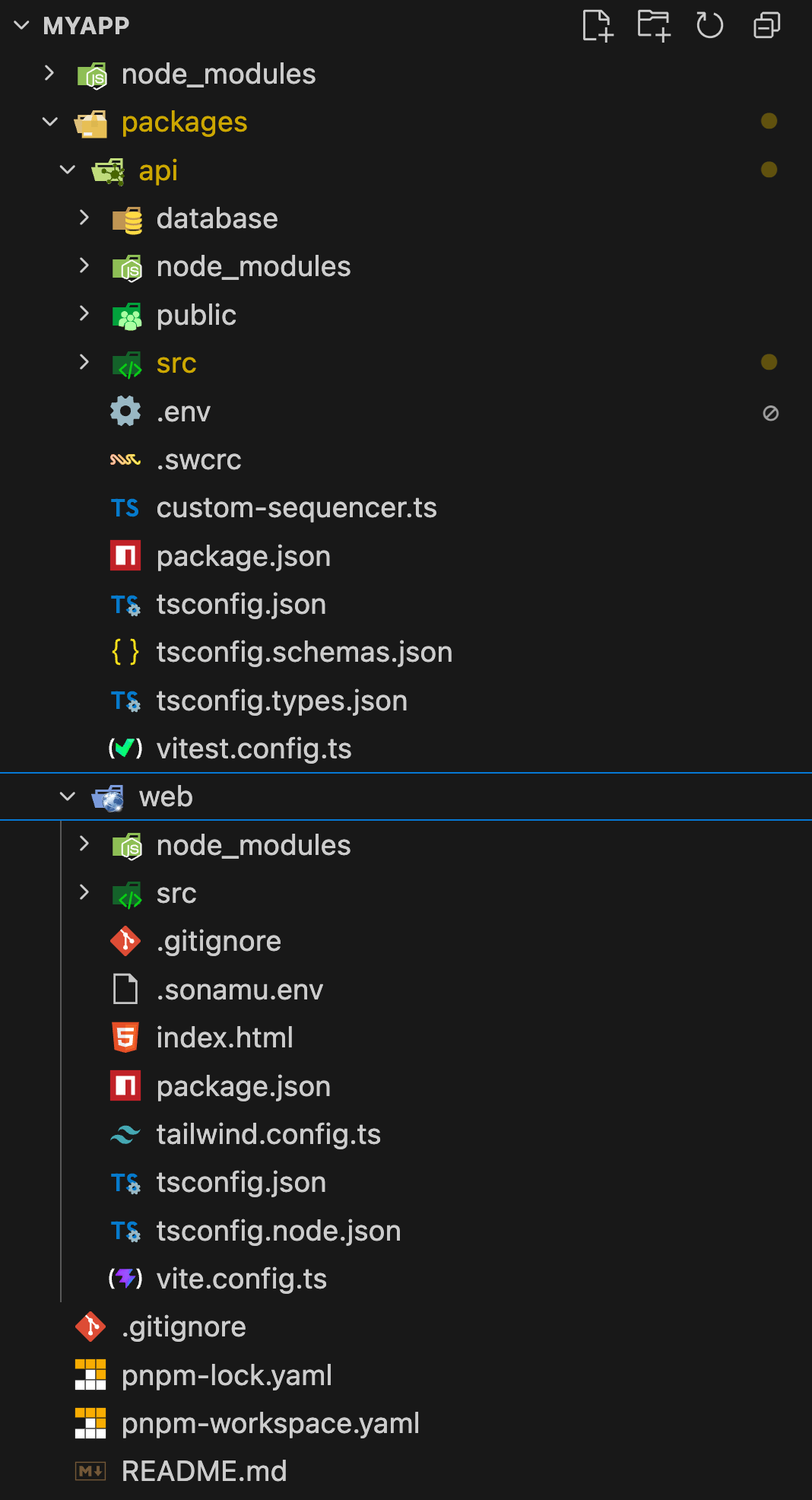
`create-sonamu` creates the following monorepo structure:
## Generated Project Structure
`create-sonamu` creates the following monorepo structure:
 ## Key Configuration Files
### pnpm Workspace
The root `pnpm-workspace.yaml` manages monorepo packages and common dependency versions:
```yaml title="pnpm-workspace.yaml" theme={null}
packages:
- packages/api
- packages/web
catalog:
"@tanstack/react-query": ^5.90.12
"@tanstack/react-router": 1.143.11
react: ^19.2.3
vite: 7.3.0
vitest: 4.0.16
# ... other common dependencies
```
### API Server Entry Point
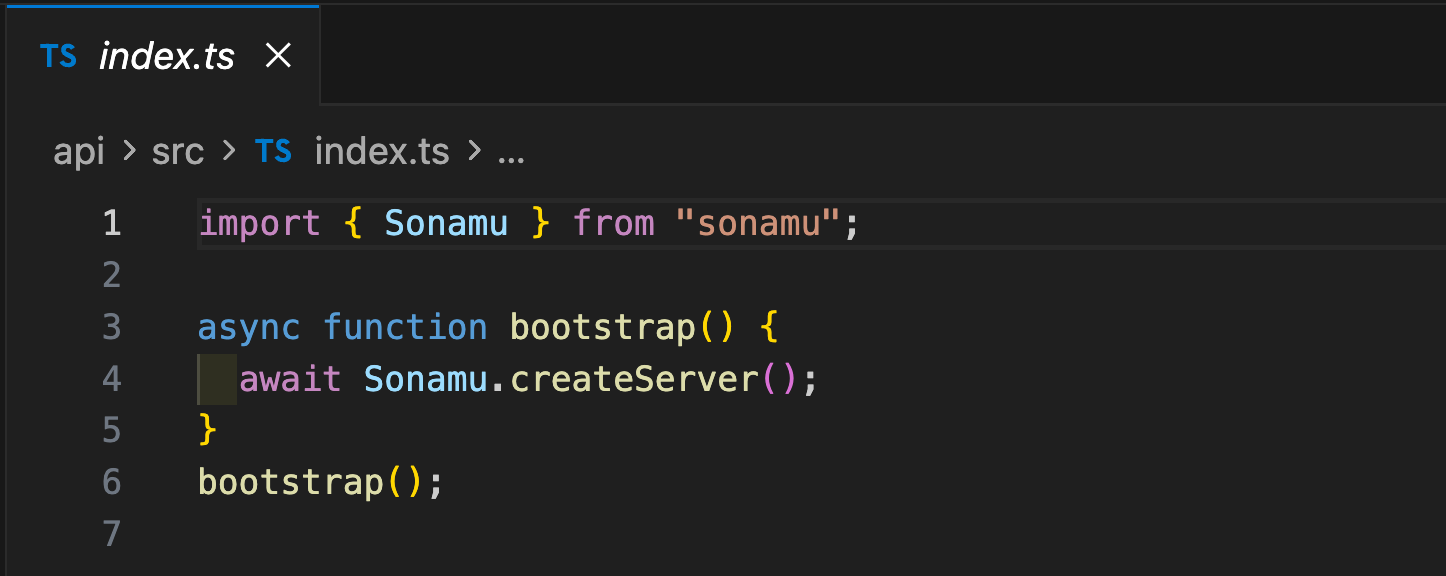
The entry point of the generated API server is as follows:
## Key Configuration Files
### pnpm Workspace
The root `pnpm-workspace.yaml` manages monorepo packages and common dependency versions:
```yaml title="pnpm-workspace.yaml" theme={null}
packages:
- packages/api
- packages/web
catalog:
"@tanstack/react-query": ^5.90.12
"@tanstack/react-router": 1.143.11
react: ^19.2.3
vite: 7.3.0
vitest: 4.0.16
# ... other common dependencies
```
### API Server Entry Point
The entry point of the generated API server is as follows:
 ### Sonamu Configuration
Manage your project's main settings in `sonamu.config.ts`:
```typescript title="packages/api/src/sonamu.config.ts" theme={null}
import path from "node:path";
import { CachePresets, defineConfig } from "sonamu";
import { drivers as cacheDrivers, store } from "sonamu/cache";
import { drivers } from "sonamu/storage";
const host = "localhost";
const port = 34900;
export default defineConfig({
projectName: process.env.PROJECT_NAME ?? "SonamuProject",
api: {
dir: "api",
timezone: "Asia/Seoul",
route: {
prefix: "/api",
},
},
i18n: {
defaultLocale: "ko",
supportedLocales: ["ko", "en"],
},
sync: {
targets: ["web"],
},
database: {
database: "pg",
name: process.env.DATABASE_NAME ?? "database_name",
defaultOptions: {
connection: {
host: process.env.DB_HOST || "0.0.0.0",
port: Number(process.env.DB_PORT) || 5432,
user: process.env.DB_USER || "postgres",
password: process.env.DB_PASSWORD,
},
},
},
server: {
listen: { port, host },
// ... server, storage, cache settings
cache: {
default: "main",
stores: {
main: store().useL1Layer(cacheDrivers.memory({ maxSize: "50mb" })),
},
ttl: "5m",
},
},
});
```
### Docker Compose Configuration
PostgreSQL database is managed with Docker:
```yaml title="packages/api/database/docker-compose.yml" theme={null}
version: "3.8"
name: ${CONTAINER_NAME}
services:
pg:
platform: linux/arm64
image: pgvector/pgvector:pg18
container_name: ${CONTAINER_NAME}
env_file:
- ../.env
volumes:
- ./fixtures/init.sh:/docker-entrypoint-initdb.d/init.sh
environment:
DATABASE_NAME: ${DATABASE_NAME}
POSTGRES_DB: template1
POSTGRES_USER: ${DB_USER}
POSTGRES_PASSWORD: ${DB_PASSWORD}
TZ: Asia/Seoul
ports:
- "${DB_PORT}:5432"
```
### Frontend Configuration
A Vite + React + TanStack Router + SSR based application is generated:
```typescript title="packages/web/vite.config.ts" theme={null}
import tailwindcss from "@tailwindcss/vite";
import { tanstackRouter } from "@tanstack/router-plugin/vite";
import react from "@vitejs/plugin-react";
import dotenv from "dotenv";
import path from "path";
import Icons from "unplugin-icons/vite";
import { defineConfig } from "vite";
dotenv.config({ path: ".sonamu.env" });
export default defineConfig(({ command, isSsrBuild }) => ({
plugins: [
react(),
Icons({ compiler: "jsx", jsx: "react", autoInstall: true }),
tailwindcss(),
tanstackRouter(),
],
resolve: {
alias: {
"@": path.resolve(__dirname, "./src"),
},
},
server: {
host: "0.0.0.0",
proxy: {
"/api": `http://${process.env.API_HOST}:${process.env.API_PORT}`,
},
},
// SSR configuration included
}));
```
## Port Configuration
Default ports are configured as follows:
| Service | Port | Description |
| ---------- | ----- | -------------------------------------------------------------------- |
| API Server | 34900 | Fastify-based REST API |
| Sonamu UI | - | [http://localhost:34900/sonamu-ui](http://localhost:34900/sonamu-ui) |
| Web App | 5173 | Vite development server (Vite default, SSR support) |
| PostgreSQL | 5432 | Database |
* **Sonamu UI**: Access via the API server's `/sonamu-ui` path, not a separate port. - API server
port: Modify the `port` constant in `packages/api/src/sonamu.config.ts` (in this case, also modify
`API_PORT` in `packages/web/.sonamu.env`) - Web app port: Modify `server.port` in
`packages/web/vite.config.ts`
## Next Steps
Once installation is complete, follow the [Quick Start](/en/getting-started/quick-start) guide to create your first entity and build an API.
### Sonamu Configuration
Manage your project's main settings in `sonamu.config.ts`:
```typescript title="packages/api/src/sonamu.config.ts" theme={null}
import path from "node:path";
import { CachePresets, defineConfig } from "sonamu";
import { drivers as cacheDrivers, store } from "sonamu/cache";
import { drivers } from "sonamu/storage";
const host = "localhost";
const port = 34900;
export default defineConfig({
projectName: process.env.PROJECT_NAME ?? "SonamuProject",
api: {
dir: "api",
timezone: "Asia/Seoul",
route: {
prefix: "/api",
},
},
i18n: {
defaultLocale: "ko",
supportedLocales: ["ko", "en"],
},
sync: {
targets: ["web"],
},
database: {
database: "pg",
name: process.env.DATABASE_NAME ?? "database_name",
defaultOptions: {
connection: {
host: process.env.DB_HOST || "0.0.0.0",
port: Number(process.env.DB_PORT) || 5432,
user: process.env.DB_USER || "postgres",
password: process.env.DB_PASSWORD,
},
},
},
server: {
listen: { port, host },
// ... server, storage, cache settings
cache: {
default: "main",
stores: {
main: store().useL1Layer(cacheDrivers.memory({ maxSize: "50mb" })),
},
ttl: "5m",
},
},
});
```
### Docker Compose Configuration
PostgreSQL database is managed with Docker:
```yaml title="packages/api/database/docker-compose.yml" theme={null}
version: "3.8"
name: ${CONTAINER_NAME}
services:
pg:
platform: linux/arm64
image: pgvector/pgvector:pg18
container_name: ${CONTAINER_NAME}
env_file:
- ../.env
volumes:
- ./fixtures/init.sh:/docker-entrypoint-initdb.d/init.sh
environment:
DATABASE_NAME: ${DATABASE_NAME}
POSTGRES_DB: template1
POSTGRES_USER: ${DB_USER}
POSTGRES_PASSWORD: ${DB_PASSWORD}
TZ: Asia/Seoul
ports:
- "${DB_PORT}:5432"
```
### Frontend Configuration
A Vite + React + TanStack Router + SSR based application is generated:
```typescript title="packages/web/vite.config.ts" theme={null}
import tailwindcss from "@tailwindcss/vite";
import { tanstackRouter } from "@tanstack/router-plugin/vite";
import react from "@vitejs/plugin-react";
import dotenv from "dotenv";
import path from "path";
import Icons from "unplugin-icons/vite";
import { defineConfig } from "vite";
dotenv.config({ path: ".sonamu.env" });
export default defineConfig(({ command, isSsrBuild }) => ({
plugins: [
react(),
Icons({ compiler: "jsx", jsx: "react", autoInstall: true }),
tailwindcss(),
tanstackRouter(),
],
resolve: {
alias: {
"@": path.resolve(__dirname, "./src"),
},
},
server: {
host: "0.0.0.0",
proxy: {
"/api": `http://${process.env.API_HOST}:${process.env.API_PORT}`,
},
},
// SSR configuration included
}));
```
## Port Configuration
Default ports are configured as follows:
| Service | Port | Description |
| ---------- | ----- | -------------------------------------------------------------------- |
| API Server | 34900 | Fastify-based REST API |
| Sonamu UI | - | [http://localhost:34900/sonamu-ui](http://localhost:34900/sonamu-ui) |
| Web App | 5173 | Vite development server (Vite default, SSR support) |
| PostgreSQL | 5432 | Database |
* **Sonamu UI**: Access via the API server's `/sonamu-ui` path, not a separate port. - API server
port: Modify the `port` constant in `packages/api/src/sonamu.config.ts` (in this case, also modify
`API_PORT` in `packages/web/.sonamu.env`) - Web app port: Modify `server.port` in
`packages/web/vite.config.ts`
## Next Steps
Once installation is complete, follow the [Quick Start](/en/getting-started/quick-start) guide to create your first entity and build an API.