> ## Documentation Index
> Fetch the complete documentation index at: https://sonamu.cartanova.ai/llms.txt
> Use this file to discover all available pages before exploring further.
# Getting Started
> Running and accessing Sonamu UI
Sonamu UI is a **web-based development tool for managing Entities, Migrations, Scaffolding, and Fixtures**. You can perform tasks that were done via CLI with a more intuitive visual interface, and it also provides test result viewing and CDD contract management features.
## What is Sonamu UI?
Sonamu UI provides the following features:
| Feature | Description | CLI Equivalent |
| --------------------- | ---------------------------------------------------- | ------------------ |
| **Entity Management** | Create, edit, delete Entities | `pnpm stub entity` |
| **DB Migration** | Create and run migrations | `pnpm migrate` |
| **Scaffolding** | Auto-generate Models, tests | `pnpm scaffold` |
| **Fixture** | Manage test data | `pnpm fixture` |
| **i18n** | Manage internationalization strings | Manual editing |
| **Tasks** | Monitor workflow execution | - |
| **Test Results** | View test execution results | - |
| **CDD** | Contract-Driven Development contract/spec management | - |
## How to Run
### Running in Development Environment
Sonamu UI is **built into the API server**. No separate command is needed.
```bash theme={null}
# Run API server
cd api
pnpm dev
```
When the API server starts, Sonamu UI is automatically served alongside it.
**Default URL**: `http://localhost:34900/sonamu-ui`
Sonamu UI is served at the **`/sonamu-ui` path of the API server** without a separate port.
### Typical Development Workflow
```bash theme={null}
# Run API server (includes Sonamu UI)
cd api
pnpm dev
# Access in browser
# http://localhost:34900/sonamu-ui
```
## Interface Structure
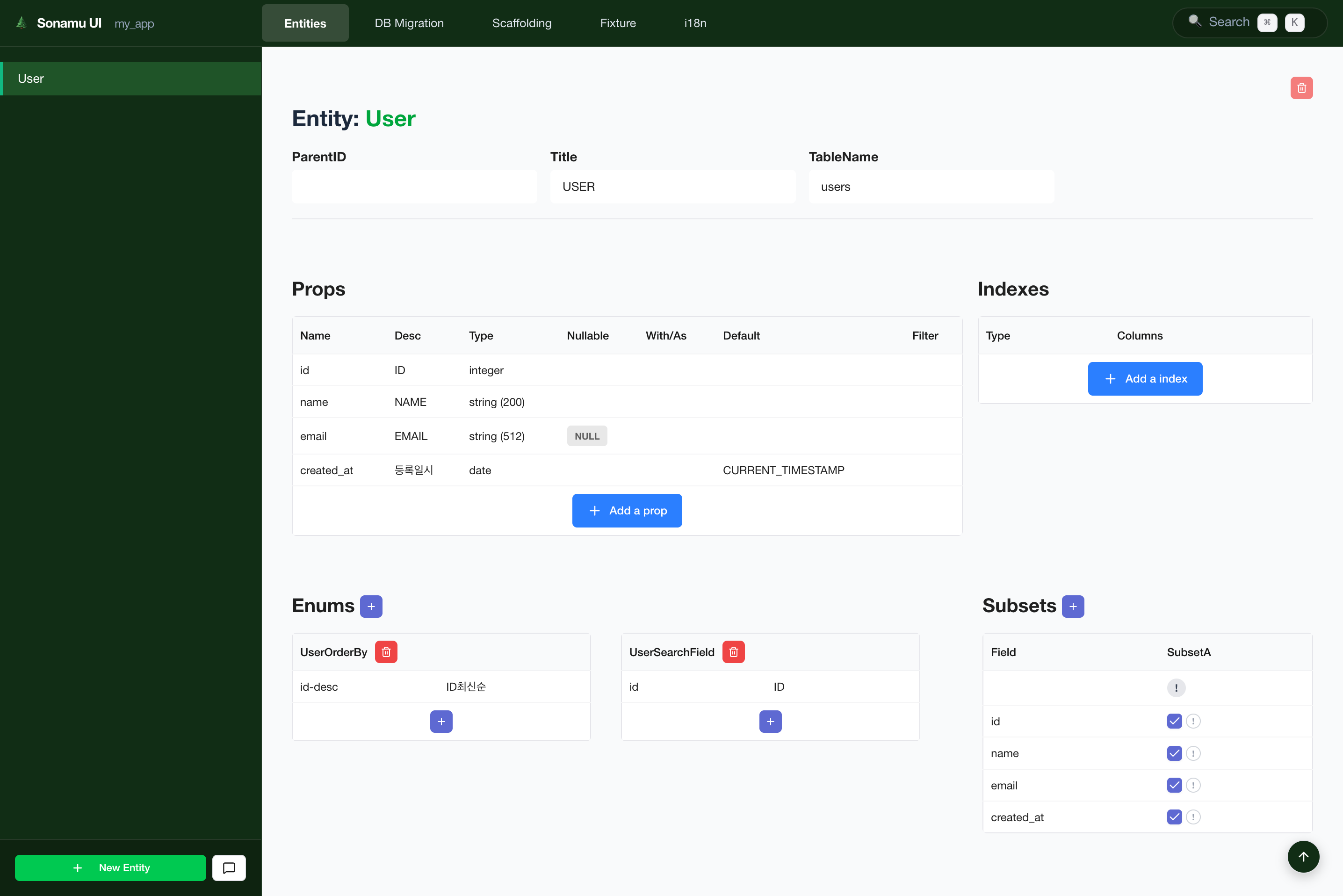 Sonamu UI consists of three main areas:
### 1. Global Navigation Bar (GNB)
Located at the top of the screen for quick access to main features.
| Menu | Function |
| ----------------- | ----------------------------------- |
| **Entities** | Create and edit Entities |
| **DB Migration** | Manage migrations |
| **Scaffolding** | Generate Model/Test code |
| **Fixture** | Manage test data |
| **i18n** | Manage internationalization strings |
| **Tasks** | Monitor workflow execution |
| **Test Results** | View test execution results |
| **CDD** | CDD contract/spec management |
| **Search** (`⌘K`) | Global search |
### 2. Sidebar
Located on the left side, displays the item list for the currently selected menu.
* **Entities tab**: Display all Entity list
* **Migrations tab**: Migration file list
* **Bottom button**: Add new item button (e.g., New Entity)
### 3. Main Content Area
The wide area in the center where you view and edit details of selected items.
* Edit Entity properties
* Preview migrations
* Code generation options, etc.
## Keyboard Shortcuts
| Shortcut | Function |
| ------------------------------- | ----------------- |
| `⌘K` (Mac) / `Ctrl+K` (Windows) | Open search modal |
| `Esc` | Close modal |
## Next Steps
Create and edit Entities
Auto-generate code
Monitor workflows
Sonamu UI consists of three main areas:
### 1. Global Navigation Bar (GNB)
Located at the top of the screen for quick access to main features.
| Menu | Function |
| ----------------- | ----------------------------------- |
| **Entities** | Create and edit Entities |
| **DB Migration** | Manage migrations |
| **Scaffolding** | Generate Model/Test code |
| **Fixture** | Manage test data |
| **i18n** | Manage internationalization strings |
| **Tasks** | Monitor workflow execution |
| **Test Results** | View test execution results |
| **CDD** | CDD contract/spec management |
| **Search** (`⌘K`) | Global search |
### 2. Sidebar
Located on the left side, displays the item list for the currently selected menu.
* **Entities tab**: Display all Entity list
* **Migrations tab**: Migration file list
* **Bottom button**: Add new item button (e.g., New Entity)
### 3. Main Content Area
The wide area in the center where you view and edit details of selected items.
* Edit Entity properties
* Preview migrations
* Code generation options, etc.
## Keyboard Shortcuts
| Shortcut | Function |
| ------------------------------- | ----------------- |
| `⌘K` (Mac) / `Ctrl+K` (Windows) | Open search modal |
| `Esc` | Close modal |
## Next Steps
Create and edit Entities
Auto-generate code
Monitor workflows