> ## Documentation Index
> Fetch the complete documentation index at: https://sonamu.cartanova.ai/llms.txt
> Use this file to discover all available pages before exploring further.
# Subset Management
> Define and manage Entity Subsets
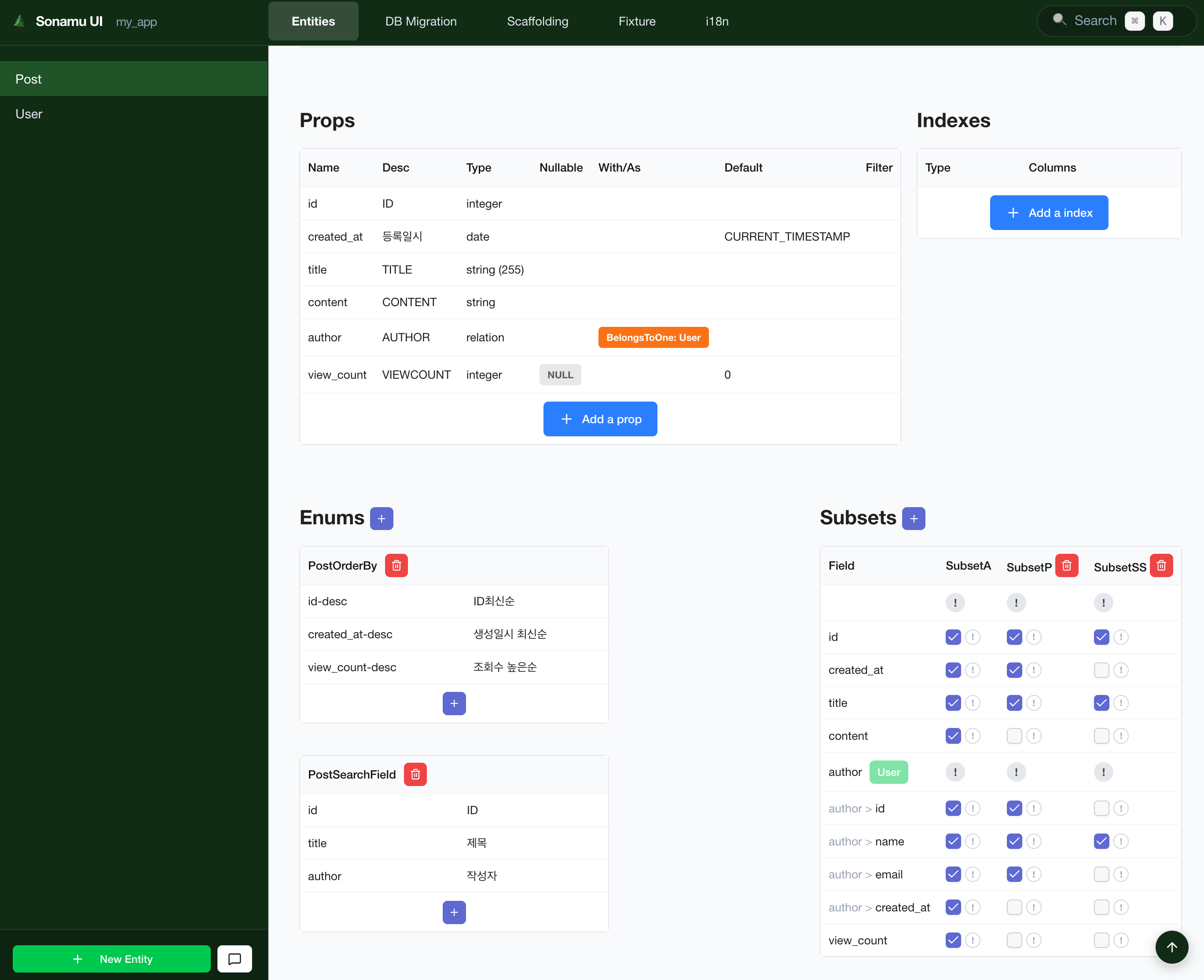
Subset is a feature that **pre-defines specific field combinations of an Entity** to efficiently manage API responses. You can visually define and edit Subsets in the **Entity tab** of Sonamu UI.
Subsets are not managed in a separate tab. They are managed in the **Subsets sheet within the
Entity tab**. After selecting an Entity, you work in the Subsets sheet alongside Properties,
Indexes, Relations, and Enums.
## What is a Subset?
A Subset is a **predefined field group that selectively retrieves only some fields** of an Entity.
### Why Use Subsets
| Problem | Subset Solution |
| ------------------------- | ----------------------------------- |
| Unnecessary data transfer | Select only needed fields |
| Inconsistent responses | Standardized field combinations |
| Complex JOINs | Control relationship data inclusion |
| Performance degradation | Query minimum data only |
### Example
```typescript theme={null}
// ❌ Query all fields (inefficient)
const users = await UserModel.findMany();
// ✅ Query only needed fields with Subset
const users = await UserModel.findMany({ subset: "A" });
// → Returns only id, email, name
```
## Subset Management Screen
### Accessing from Entity Tab
To manage Subsets in Sonamu UI:
1. Click the **Entity tab**
2. Select the **desired Entity** from the left sidebar
3. Click **Subsets** among the sheet tabs at the top
 ### Screen Layout
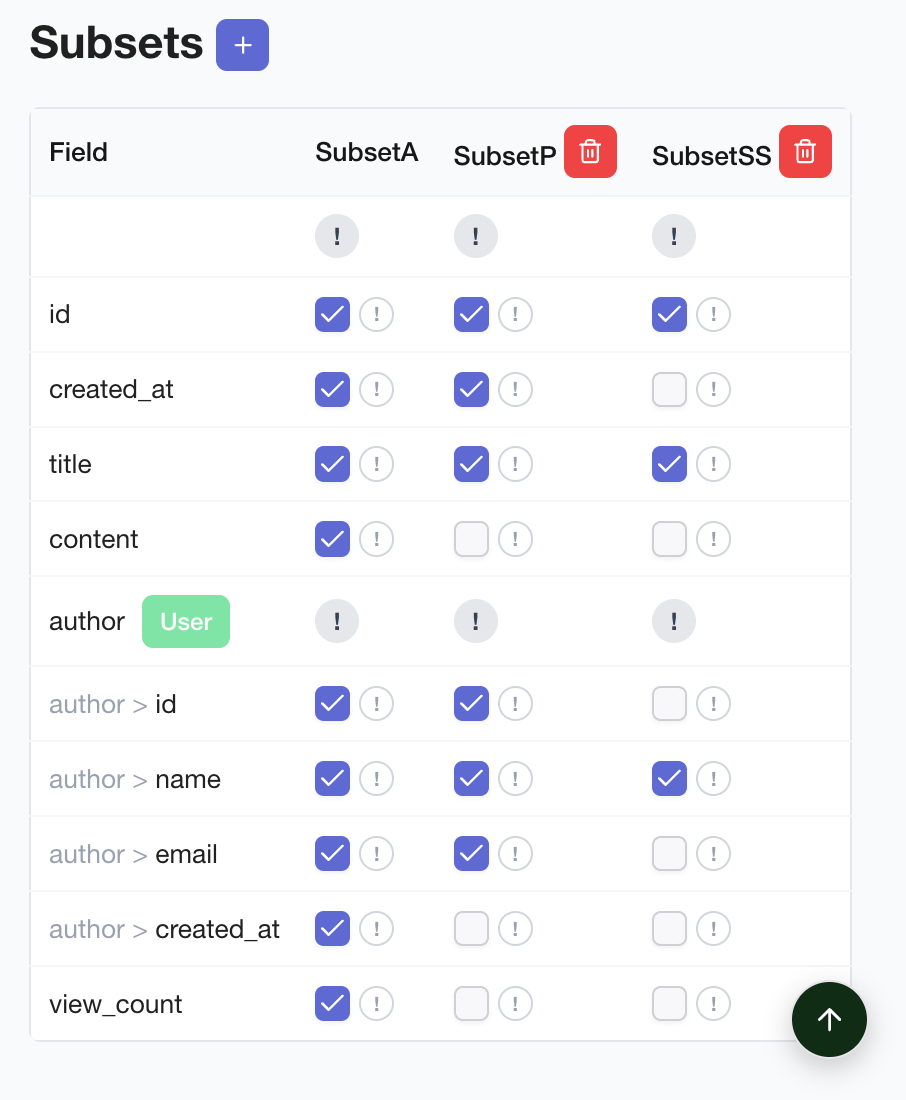
The Subsets sheet is organized as follows:
* **Left Sidebar**: Entity list (showing currently selected Entity)
* **Top Sheet Tabs**: Properties, Indexes, Relations, Enums, **Subsets**
* **Subset List**: All Subsets of the current Entity (A, B, C, etc.)
* **Field Selection Area**: Checkboxes for fields to include in the selected Subset
## Creating a Subset
### 1. Navigate to Entity Tab
Click the **Entity tab** in Sonamu UI.
### 2. Select Entity
Select the Entity to add a Subset to from the left sidebar.
### 3. Open Subsets Sheet
Click **Subsets** among the sheet tabs at the top.
### 4. Add Subset
Click the **\[Add Subset]** button to create a new Subset.
| Field | Description | Example |
| --------------- | ----------------------- | ------------------------ |
| **Subset ID** | Subset identifier (A-Z) | `A`, `B`, `C` |
| **Description** | Subset description | `For list`, `For detail` |
Subset IDs typically use **single alphabet letters** (A, B, C...).
### 5. Select Fields
Select the fields to include in the created Subset:
**Basic fields**:
```
☑ id ← Required (always included)
☑ email
☑ name
□ password ← Exclude sensitive info
□ bio
☑ created_at
```
**Relation fields**:
```
☐ posts → Post.Subset A
☐ profile → Profile.Subset B
```
## Subset Types
### Subset A (Basic List)
**Purpose**: Used for list queries
**Includes**: Required info + summary info
```typescript theme={null}
// User.Subset A
{
id: true,
email: true,
name: true,
created_at: true,
}
```
**Usage example**:
```typescript theme={null}
// User list
const users = await UserModel.findMany({ subset: "A" });
```
### Subset B (Detail View)
**Purpose**: Single record detail query
**Includes**: All general info (excluding sensitive info)
```typescript theme={null}
// User.Subset B
{
id: true,
email: true,
name: true,
bio: true,
profile_image: true,
created_at: true,
updated_at: true,
}
```
**Usage example**:
```typescript theme={null}
// User detail
const user = await UserModel.findById(1, { subset: "B" });
```
### Subset C (With Relations)
**Purpose**: Query including related data
**Includes**: Basic info + related Entities
```typescript theme={null}
// Post.Subset C
{
id: true,
title: true,
content: true,
author: "User.B", // Include User's Subset B
comments: "Comment.A", // Include Comment's Subset A
created_at: true,
}
```
**Usage example**:
```typescript theme={null}
// Post + author + comments
const post = await PostModel.findById(1, { subset: "C" });
```
## Relation Field Settings
### belongsTo Relation
**Example**: Post → User (author)
```
☐ author → User.Subset B
```
When selected, querying Post also fetches author (User) info:
```typescript theme={null}
// Result
{
id: 1,
title: "Hello World",
author: {
id: 10,
email: "user@example.com",
name: "John Doe",
// Rest of User.Subset B fields...
}
}
```
### hasMany Relation
**Example**: User → Post\[] (authored posts list)
```
☐ posts → Post.Subset A
```
When selected, querying User also fetches authored Post list:
```typescript theme={null}
// Result
{
id: 10,
email: "user@example.com",
name: "John Doe",
posts: [
{ id: 1, title: "First Post", ... },
{ id: 2, title: "Second Post", ... },
]
}
```
**N+1 problem caution**: Including hasMany relations in Subsets may cause additional queries. Only
include when necessary.
## Editing Subsets
### Add/Remove Fields
1. Navigate to the Entity's **Subsets sheet** in the Entity tab
2. Select the **Subset to edit**
3. Click field checkboxes to **change inclusion/exclusion**
4. Click **\[Save]** button
**Changes applied immediately**:
```
Before: { id, email, name }
After: { id, email, name, bio, created_at }
```
### Delete Subset
1. Navigate to the Entity's **Subsets sheet** in the Entity tab
2. Select the **Subset to delete**
3. Click **\[Delete]** button
4. Click **\[Confirm]** in the confirmation modal
**Deleting used Subset**: If there are APIs using the Subset you're deleting, errors may occur.
## Practical Examples
### User Management System
```typescript theme={null}
// User Entity Subsets
// Subset A: For list (minimal info)
{
id: true,
email: true,
name: true,
role: true,
is_active: true,
}
// Subset B: For detail (full info, excluding sensitive)
{
id: true,
email: true,
name: true,
role: true,
bio: true,
profile_image: true,
phone: true,
is_active: true,
created_at: true,
updated_at: true,
}
// Subset C: For admin (all info)
{
...Subset B,
last_login_at: true,
login_count: true,
ip_address: true,
}
```
### Blog System
```typescript theme={null}
// Post Entity Subsets
// Subset A: For list (summary)
{
id: true,
title: true,
excerpt: true,
author: "User.A",
view_count: true,
created_at: true,
}
// Subset B: For detail (full content)
{
id: true,
title: true,
content: true,
author: "User.B",
category: "Category.A",
tags: "Tag.A",
view_count: true,
created_at: true,
updated_at: true,
}
// Subset C: With comments
{
...Subset B,
comments: "Comment.A",
}
```
## Using in Models
Once Subsets are defined, they can be automatically used in Model APIs.
### Using in findMany
```typescript theme={null}
class UserModelClass extends BaseModelClass {
@api({ httpMethod: "GET" })
async findMany(params: ListParams) {
const { qb } = this.getSubsetQueries("A");
return this.executeSubsetQuery({
subset: "A",
qb,
params,
});
}
}
```
### Using in findById
```typescript theme={null}
class UserModelClass extends BaseModelClass {
@api({ httpMethod: "GET" })
async findById(id: number) {
const { qb } = this.getSubsetQueries("B");
qb.where("id", id);
return this.executeSubsetQuery({
subset: "B",
qb,
params: { num: 1, page: 1 },
}).then((result) => result.rows[0]);
}
}
```
## Performance Optimization
### Select Only Needed Fields
```typescript theme={null}
// ❌ Query all fields (slow)
SELECT * FROM users
// ✅ Use Subset A (fast)
SELECT id, email, name FROM users
```
### Minimize Relation Loading
```typescript theme={null}
// ❌ Include unnecessary relations
{
posts: "Post.C", // Loads all Post relations too
}
// ✅ Only needed relations
{
posts: "Post.A", // Only basic Post info
}
```
## Next Steps
Using Subsets in Models
Using Subsets in APIs
### Screen Layout
The Subsets sheet is organized as follows:
* **Left Sidebar**: Entity list (showing currently selected Entity)
* **Top Sheet Tabs**: Properties, Indexes, Relations, Enums, **Subsets**
* **Subset List**: All Subsets of the current Entity (A, B, C, etc.)
* **Field Selection Area**: Checkboxes for fields to include in the selected Subset
## Creating a Subset
### 1. Navigate to Entity Tab
Click the **Entity tab** in Sonamu UI.
### 2. Select Entity
Select the Entity to add a Subset to from the left sidebar.
### 3. Open Subsets Sheet
Click **Subsets** among the sheet tabs at the top.
### 4. Add Subset
Click the **\[Add Subset]** button to create a new Subset.
| Field | Description | Example |
| --------------- | ----------------------- | ------------------------ |
| **Subset ID** | Subset identifier (A-Z) | `A`, `B`, `C` |
| **Description** | Subset description | `For list`, `For detail` |
Subset IDs typically use **single alphabet letters** (A, B, C...).
### 5. Select Fields
Select the fields to include in the created Subset:
**Basic fields**:
```
☑ id ← Required (always included)
☑ email
☑ name
□ password ← Exclude sensitive info
□ bio
☑ created_at
```
**Relation fields**:
```
☐ posts → Post.Subset A
☐ profile → Profile.Subset B
```
## Subset Types
### Subset A (Basic List)
**Purpose**: Used for list queries
**Includes**: Required info + summary info
```typescript theme={null}
// User.Subset A
{
id: true,
email: true,
name: true,
created_at: true,
}
```
**Usage example**:
```typescript theme={null}
// User list
const users = await UserModel.findMany({ subset: "A" });
```
### Subset B (Detail View)
**Purpose**: Single record detail query
**Includes**: All general info (excluding sensitive info)
```typescript theme={null}
// User.Subset B
{
id: true,
email: true,
name: true,
bio: true,
profile_image: true,
created_at: true,
updated_at: true,
}
```
**Usage example**:
```typescript theme={null}
// User detail
const user = await UserModel.findById(1, { subset: "B" });
```
### Subset C (With Relations)
**Purpose**: Query including related data
**Includes**: Basic info + related Entities
```typescript theme={null}
// Post.Subset C
{
id: true,
title: true,
content: true,
author: "User.B", // Include User's Subset B
comments: "Comment.A", // Include Comment's Subset A
created_at: true,
}
```
**Usage example**:
```typescript theme={null}
// Post + author + comments
const post = await PostModel.findById(1, { subset: "C" });
```
## Relation Field Settings
### belongsTo Relation
**Example**: Post → User (author)
```
☐ author → User.Subset B
```
When selected, querying Post also fetches author (User) info:
```typescript theme={null}
// Result
{
id: 1,
title: "Hello World",
author: {
id: 10,
email: "user@example.com",
name: "John Doe",
// Rest of User.Subset B fields...
}
}
```
### hasMany Relation
**Example**: User → Post\[] (authored posts list)
```
☐ posts → Post.Subset A
```
When selected, querying User also fetches authored Post list:
```typescript theme={null}
// Result
{
id: 10,
email: "user@example.com",
name: "John Doe",
posts: [
{ id: 1, title: "First Post", ... },
{ id: 2, title: "Second Post", ... },
]
}
```
**N+1 problem caution**: Including hasMany relations in Subsets may cause additional queries. Only
include when necessary.
## Editing Subsets
### Add/Remove Fields
1. Navigate to the Entity's **Subsets sheet** in the Entity tab
2. Select the **Subset to edit**
3. Click field checkboxes to **change inclusion/exclusion**
4. Click **\[Save]** button
**Changes applied immediately**:
```
Before: { id, email, name }
After: { id, email, name, bio, created_at }
```
### Delete Subset
1. Navigate to the Entity's **Subsets sheet** in the Entity tab
2. Select the **Subset to delete**
3. Click **\[Delete]** button
4. Click **\[Confirm]** in the confirmation modal
**Deleting used Subset**: If there are APIs using the Subset you're deleting, errors may occur.
## Practical Examples
### User Management System
```typescript theme={null}
// User Entity Subsets
// Subset A: For list (minimal info)
{
id: true,
email: true,
name: true,
role: true,
is_active: true,
}
// Subset B: For detail (full info, excluding sensitive)
{
id: true,
email: true,
name: true,
role: true,
bio: true,
profile_image: true,
phone: true,
is_active: true,
created_at: true,
updated_at: true,
}
// Subset C: For admin (all info)
{
...Subset B,
last_login_at: true,
login_count: true,
ip_address: true,
}
```
### Blog System
```typescript theme={null}
// Post Entity Subsets
// Subset A: For list (summary)
{
id: true,
title: true,
excerpt: true,
author: "User.A",
view_count: true,
created_at: true,
}
// Subset B: For detail (full content)
{
id: true,
title: true,
content: true,
author: "User.B",
category: "Category.A",
tags: "Tag.A",
view_count: true,
created_at: true,
updated_at: true,
}
// Subset C: With comments
{
...Subset B,
comments: "Comment.A",
}
```
## Using in Models
Once Subsets are defined, they can be automatically used in Model APIs.
### Using in findMany
```typescript theme={null}
class UserModelClass extends BaseModelClass {
@api({ httpMethod: "GET" })
async findMany(params: ListParams) {
const { qb } = this.getSubsetQueries("A");
return this.executeSubsetQuery({
subset: "A",
qb,
params,
});
}
}
```
### Using in findById
```typescript theme={null}
class UserModelClass extends BaseModelClass {
@api({ httpMethod: "GET" })
async findById(id: number) {
const { qb } = this.getSubsetQueries("B");
qb.where("id", id);
return this.executeSubsetQuery({
subset: "B",
qb,
params: { num: 1, page: 1 },
}).then((result) => result.rows[0]);
}
}
```
## Performance Optimization
### Select Only Needed Fields
```typescript theme={null}
// ❌ Query all fields (slow)
SELECT * FROM users
// ✅ Use Subset A (fast)
SELECT id, email, name FROM users
```
### Minimize Relation Loading
```typescript theme={null}
// ❌ Include unnecessary relations
{
posts: "Post.C", // Loads all Post relations too
}
// ✅ Only needed relations
{
posts: "Post.A", // Only basic Post info
}
```
## Next Steps
Using Subsets in Models
Using Subsets in APIs