> ## Documentation Index
> Fetch the complete documentation index at: https://sonamu.cartanova.ai/llms.txt
> Use this file to discover all available pages before exploring further.
# Key Features
> Key features of Sonamu VS Code Extension
The Sonamu Extension integrates with the Naite test framework to provide various development support features.
## Naite Key Autocomplete
When typing `Naite.t("`, `Naite.del("`, `Naite.get("`, all Naite keys in the project are autocompleted.
### How It Works
The Extension scans all TypeScript files in the workspace and collects keys used in `Naite.t()` calls. This key list is provided as autocomplete candidates.
## Key Navigation
You can quickly jump to definition and reference locations from Naite key strings.
### Go to Definition
* **Shortcut**: F12
* **Action**: Jump to `Naite.t("key")` location
### Go to References
* **Shortcut**: Shift+F12
* **Action**: Display list of `Naite.get("key")`, `Naite.del("key")` locations
### Cmd+Click
Cmd+Click behavior depends on VS Code settings and jumps to definition or references:
* `editor.gotoLocation.multipleDefinitions`: Behavior when multiple definitions exist
* `editor.gotoLocation.multipleReferences`: Behavior when multiple references exist
## Key Highlighting
Applies visual decoration to Naite key strings for easy identification in code.
### Settings
Enable/disable with `sonamu.naite.decoration.enabled`, and change style with `sonamu.naite.decoration.style`:
* `underline` (default)
* `bold`
* `italic`
* `underline bold`
* `underline italic`
* `none`
## Hover Information
Hover over a Naite key to display usage information for that key.
 ## Inline Value Display
After running tests, displays recorded values inline next to `Naite.t()` calls.
```typescript theme={null}
Naite.t("result", data); // → { id: 1, name: "test" }
```
### Settings
* `sonamu.naite.runtimeValue.enabled`: Enable/disable feature (default: `true`)
* `sonamu.naite.runtimeValue.maxLength`: Maximum length of displayed value (default: `50`)
Long values are automatically truncated.
## Naite Trace Viewer
A dedicated viewer to check all values recorded with `Naite.t()` during test execution in real-time.
### Opening
Run `Sonamu: Open Naite Trace Viewer` from the Command Palette, or it opens automatically when running tests.
### Key Features
**Grouping by Test**
Traces are displayed grouped by test suite and case.
## Inline Value Display
After running tests, displays recorded values inline next to `Naite.t()` calls.
```typescript theme={null}
Naite.t("result", data); // → { id: 1, name: "test" }
```
### Settings
* `sonamu.naite.runtimeValue.enabled`: Enable/disable feature (default: `true`)
* `sonamu.naite.runtimeValue.maxLength`: Maximum length of displayed value (default: `50`)
Long values are automatically truncated.
## Naite Trace Viewer
A dedicated viewer to check all values recorded with `Naite.t()` during test execution in real-time.
### Opening
Run `Sonamu: Open Naite Trace Viewer` from the Command Palette, or it opens automatically when running tests.
### Key Features
**Grouping by Test**
Traces are displayed grouped by test suite and case.
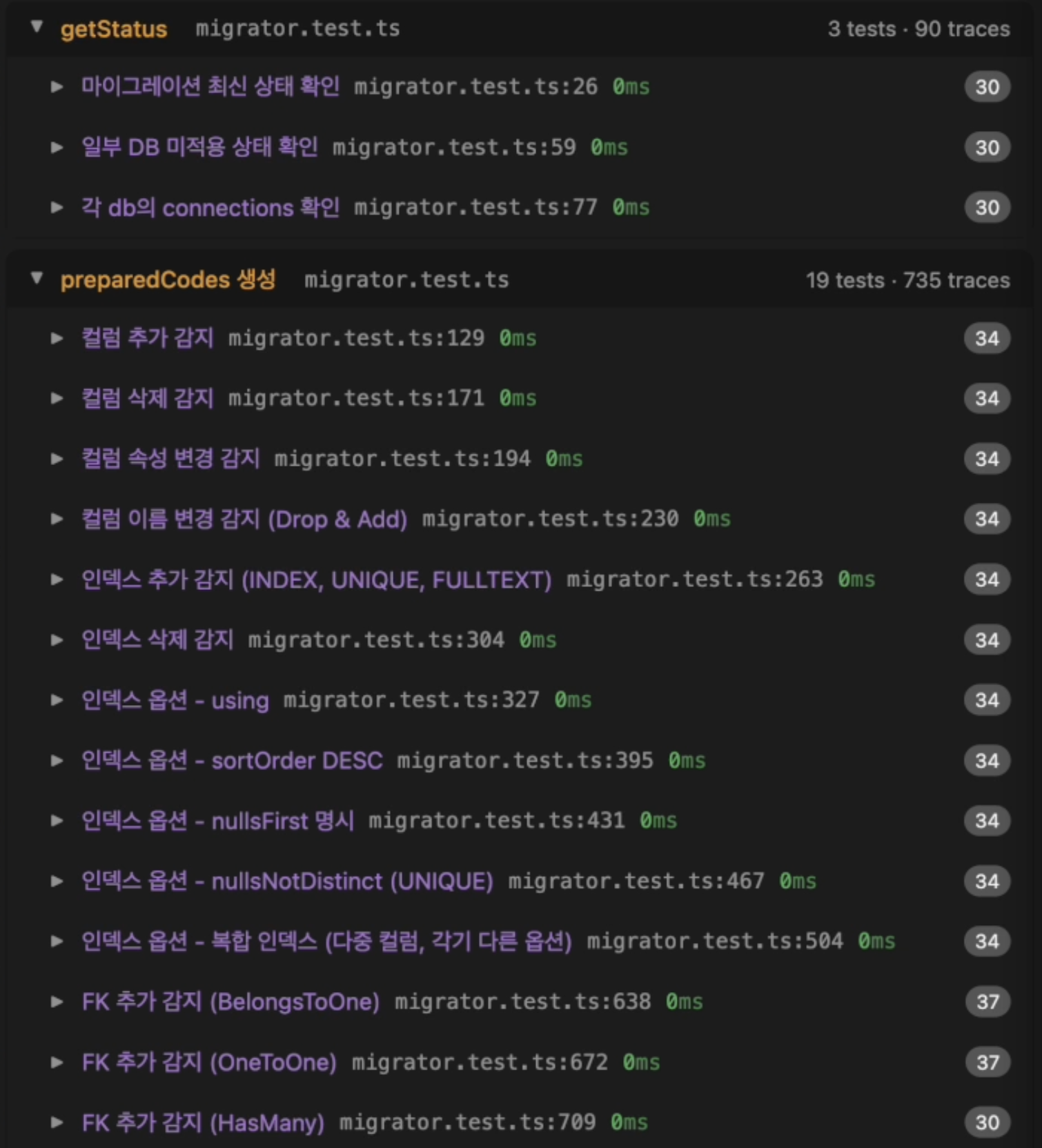 **Trace Information Display**
Each trace includes the following information:
* Key name
* Recorded value (JSON format)
* File path and line number
* Recording time
**Jump to Code Location**
Click a trace to jump to that `Naite.t()` call location.
**Search Feature**
Search by key or value within the Trace viewer.
**Follow Mode**
When selecting a Naite call in code, the Trace Viewer automatically scrolls to that item.
### Vitest Setup
To display test case line numbers, set `includeTaskLocation: true` in `vitest.config.ts`:
```typescript theme={null}
export default defineConfig({
test: {
includeTaskLocation: true,
},
});
```
## Symbol Search
Search for Naite keys in Workspace Symbol Search.
* **Shortcut**: Cmd+T
* **Usage**: Type key name to find all usage locations
## Undefined Key Warnings
Displays warnings when `Naite.get()` or `Naite.del()` references a key that hasn't been defined with `Naite.t()`. Warnings can be viewed in the VS Code Problems panel (Cmd+Shift+M).
**Trace Information Display**
Each trace includes the following information:
* Key name
* Recorded value (JSON format)
* File path and line number
* Recording time
**Jump to Code Location**
Click a trace to jump to that `Naite.t()` call location.
**Search Feature**
Search by key or value within the Trace viewer.
**Follow Mode**
When selecting a Naite call in code, the Trace Viewer automatically scrolls to that item.
### Vitest Setup
To display test case line numbers, set `includeTaskLocation: true` in `vitest.config.ts`:
```typescript theme={null}
export default defineConfig({
test: {
includeTaskLocation: true,
},
});
```
## Symbol Search
Search for Naite keys in Workspace Symbol Search.
* **Shortcut**: Cmd+T
* **Usage**: Type key name to find all usage locations
## Undefined Key Warnings
Displays warnings when `Naite.get()` or `Naite.del()` references a key that hasn't been defined with `Naite.t()`. Warnings can be viewed in the VS Code Problems panel (Cmd+Shift+M).
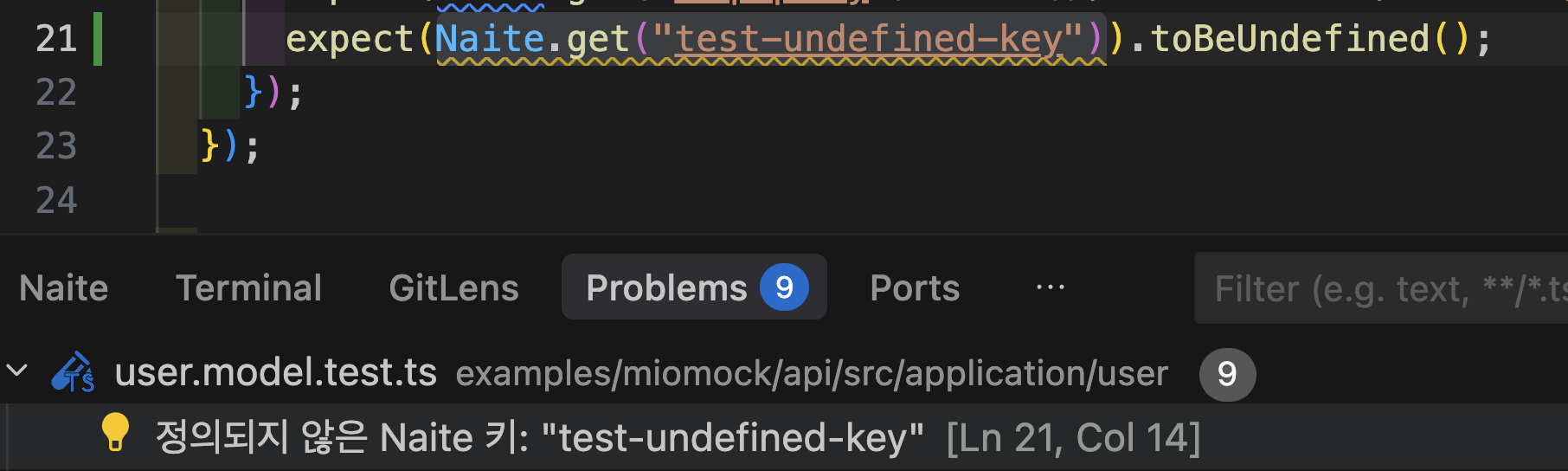 This feature is useful for quickly finding typos or missing keys.
## View Container
The Extension adds a "Naite" View Container to the panel area.
This feature is useful for quickly finding typos or missing keys.
## View Container
The Extension adds a "Naite" View Container to the panel area.
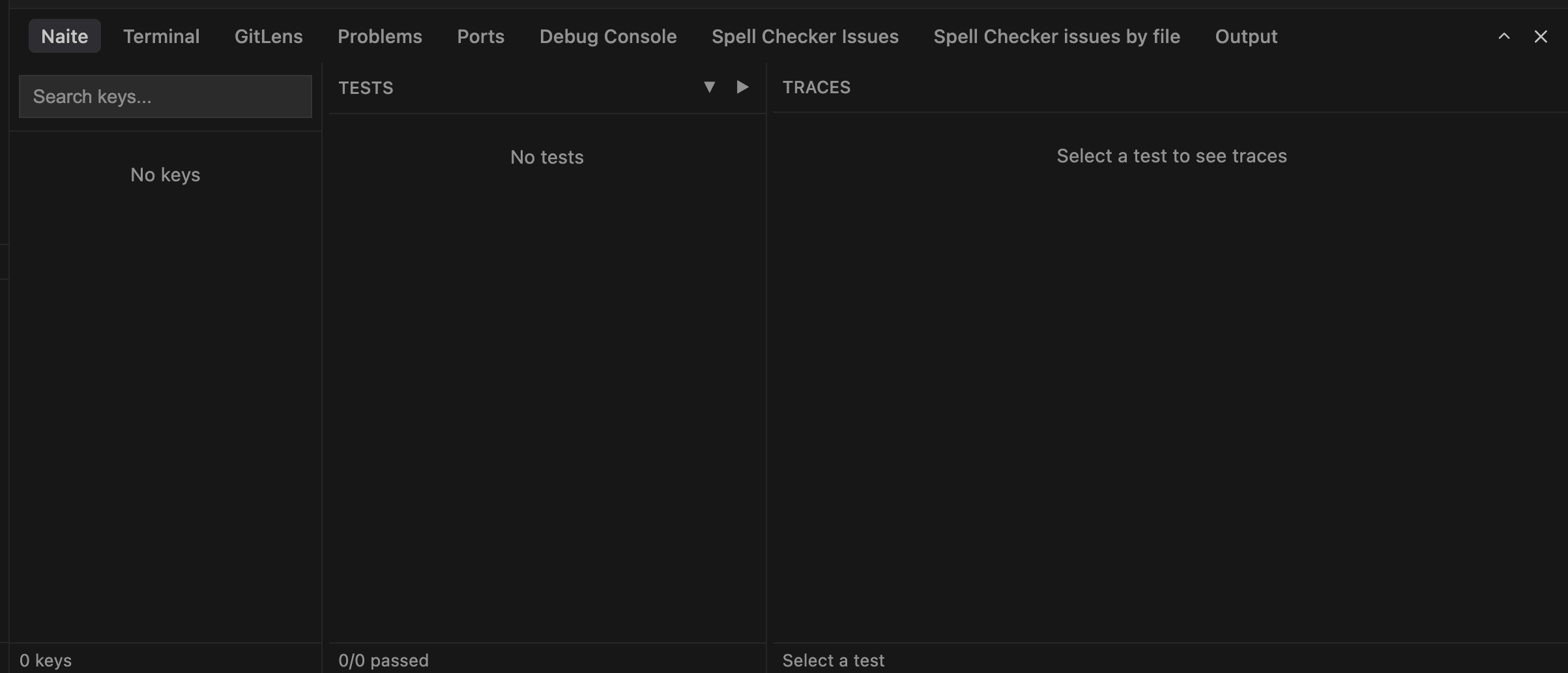 You can quickly check Trace information from this panel.
## Status Bar Messages
Displays notification messages in the status bar when Naite tracker actions occur (key add, delete, etc.).
Enable/disable with `sonamu.naite.statusBarMessages.enabled` setting (default: `true`).
You can quickly check Trace information from this panel.
## Status Bar Messages
Displays notification messages in the status bar when Naite tracker actions occur (key add, delete, etc.).
Enable/disable with `sonamu.naite.statusBarMessages.enabled` setting (default: `true`).