> ## Documentation Index
> Fetch the complete documentation index at: https://sonamu.cartanova.ai/llms.txt
> Use this file to discover all available pages before exploring further.
# Shortcuts & Commands
> Sonamu Extension shortcuts and commands
Available shortcuts and Command Palette commands in the Sonamu Extension.
## Keyboard Shortcuts
### Navigation
| Shortcut | Action | Description |
| --------- | --------------------------- | ---------------------------------------------------------------------------- |
| F12 | Go to Definition | Jump to Naite key's definition location (`Naite.t()`) |
| Shift+F12 | Go to References | Display all reference locations for Naite key (`Naite.get()`, `Naite.del()`) |
| Cmd+Click | Go to Definition/References | Jump to definition or references based on VS Code settings |
| Cmd+T | Workspace Symbol Search | Search for Naite keys in workspace |
### Autocomplete
| Trigger | Action | Description |
| ------------- | ---------------- | -------------------------- |
| `Naite.t("` | Key autocomplete | Display all Naite key list |
| `Naite.get("` | Key autocomplete | Display all Naite key list |
| `Naite.del("` | Key autocomplete | Display all Naite key list |
When autocomplete triggers, navigate with arrow keys and select with Enter or Tab.


 ## Command Palette Commands
Use the following commands from the Command Palette (Cmd+Shift+P).
### Sonamu: Open Naite Trace Viewer
Opens the Naite Trace Viewer. Check values recorded with `Naite.t()` during test execution in real-time.
```
Cmd+Shift+P → "Sonamu: Open Naite Trace Viewer"
```
### Sonamu: Rescan Naite Keys
Rescans all Naite keys in the workspace. Useful when the key list isn't updated or autocomplete isn't working.
```
Cmd+Shift+P → "Sonamu: Rescan Naite Keys"
```
Running this displays the number of found keys as a notification.
## Context Menu
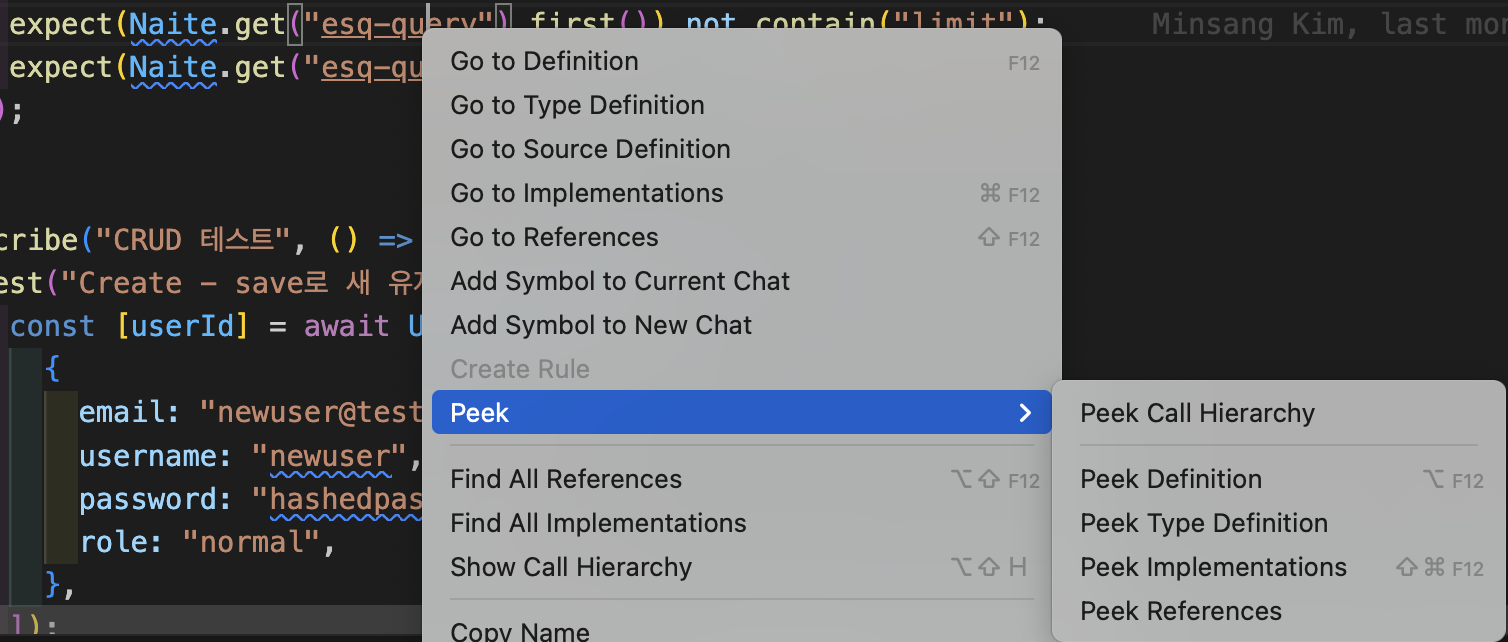
Right-clicking on a Naite key string displays the following menu:
* **Go to Definition**: Jump to definition location
* **Go to References**: Display reference location list
* **Peek Definition**: Preview definition inline
* **Peek References**: Preview references inline
## Command Palette Commands
Use the following commands from the Command Palette (Cmd+Shift+P).
### Sonamu: Open Naite Trace Viewer
Opens the Naite Trace Viewer. Check values recorded with `Naite.t()` during test execution in real-time.
```
Cmd+Shift+P → "Sonamu: Open Naite Trace Viewer"
```
### Sonamu: Rescan Naite Keys
Rescans all Naite keys in the workspace. Useful when the key list isn't updated or autocomplete isn't working.
```
Cmd+Shift+P → "Sonamu: Rescan Naite Keys"
```
Running this displays the number of found keys as a notification.
## Context Menu
Right-clicking on a Naite key string displays the following menu:
* **Go to Definition**: Jump to definition location
* **Go to References**: Display reference location list
* **Peek Definition**: Preview definition inline
* **Peek References**: Preview references inline
 ## Changing Shortcuts in Settings
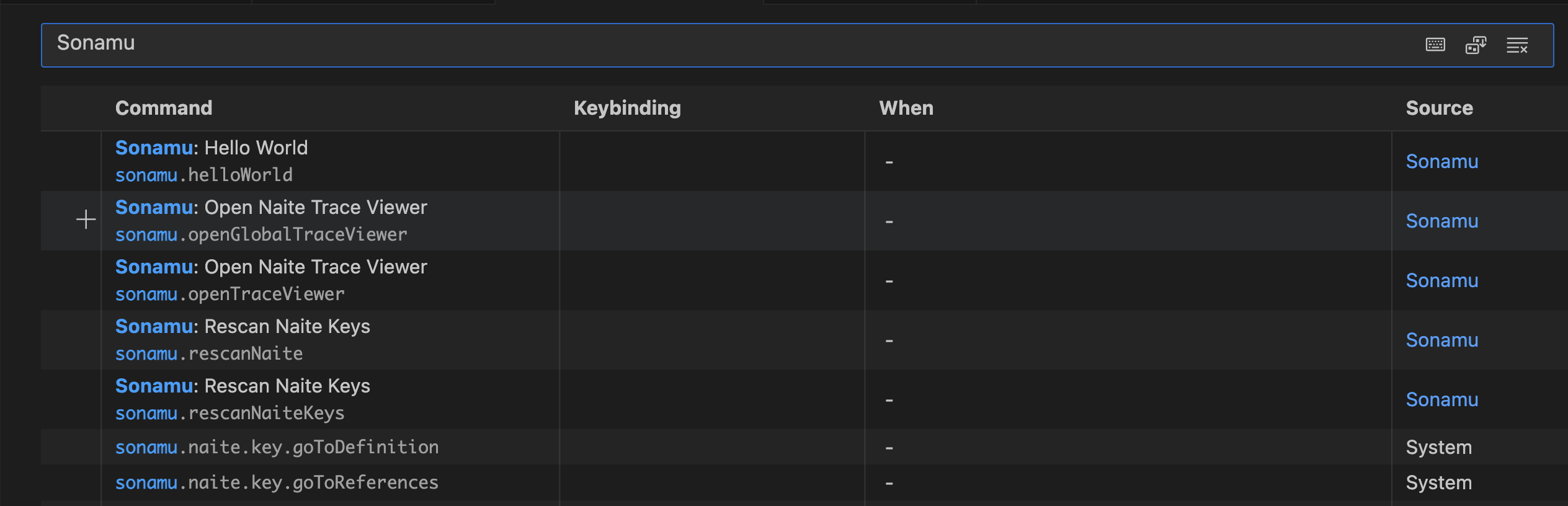
You can customize shortcuts in VS Code settings:
1. Open Command Palette (Cmd+Shift+P)
2. Run "Preferences: Open Keyboard Shortcuts"
3. Search "Sonamu" to find related commands
4. Change to desired shortcuts
## Changing Shortcuts in Settings
You can customize shortcuts in VS Code settings:
1. Open Command Palette (Cmd+Shift+P)
2. Run "Preferences: Open Keyboard Shortcuts"
3. Search "Sonamu" to find related commands
4. Change to desired shortcuts
 ## Common Workflows
### Test Writing Workflow
1. Type `Naite.t("` for key autocomplete
2. Run tests
3. Trace Viewer opens automatically
4. Click trace to check code location
5. Verify values with `Naite.get()` as needed
### Debugging Workflow
1. Add `Naite.t()` to problematic section
2. Run tests
3. Check recorded values in Trace Viewer
4. Jump to location with F12
5. Fix code and rerun
### Key Cleanup Workflow
1. Open Workspace Symbol Search with `Cmd+T`
2. Search for key to clean up
3. Check all references with Shift+F12
4. Remove unused keys
## Common Workflows
### Test Writing Workflow
1. Type `Naite.t("` for key autocomplete
2. Run tests
3. Trace Viewer opens automatically
4. Click trace to check code location
5. Verify values with `Naite.get()` as needed
### Debugging Workflow
1. Add `Naite.t()` to problematic section
2. Run tests
3. Check recorded values in Trace Viewer
4. Jump to location with F12
5. Fix code and rerun
### Key Cleanup Workflow
1. Open Workspace Symbol Search with `Cmd+T`
2. Search for key to clean up
3. Check all references with Shift+F12
4. Remove unused keys