Overall Structure
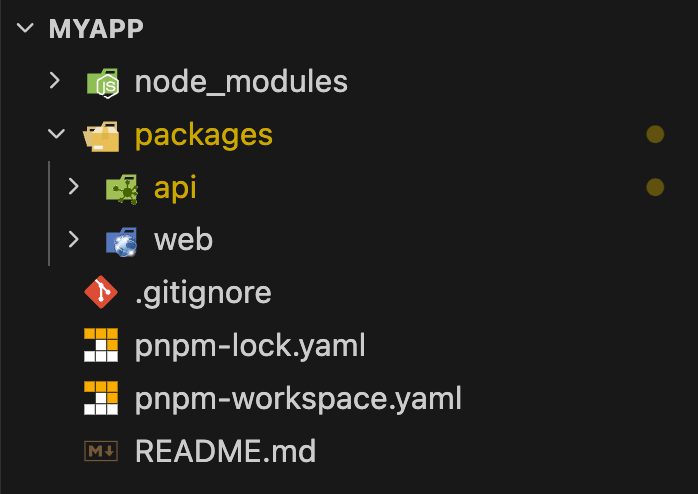
Complete directory structure of a Sonamu project opened in VS Code
pnpm Workspace
The rootpnpm-workspace.yaml manages packages and common dependency versions:
pnpm-workspace.yaml
API Directory (Backend)
Root Files
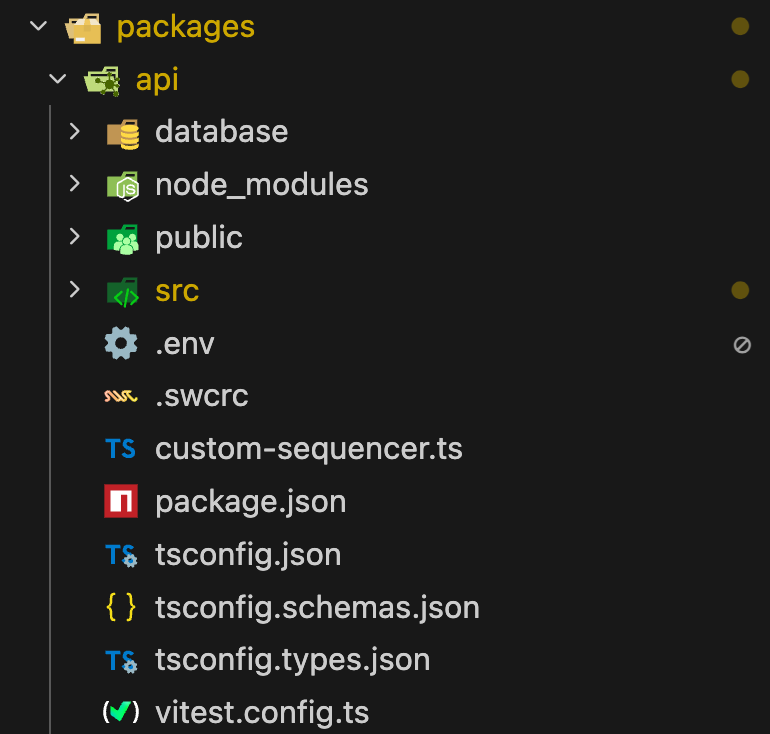
Actual file structure of packages/api directory
Key File Descriptions
Key File Descriptions
package.json
- Backend dependency management
- npm scripts:
dev,build,test,docker:up/down,dump,seed, etc.
- Vitest test configuration
- Sonamu-optimized settings via
getSonamuTestConfig()function - Coverage, reporter, sequencer configuration
- Main TypeScript compiler configuration
tsconfig.schemas.json: Dedicated for Zod schema generationtsconfig.types.json: Dedicated for type definition generation
- Database connection info (DB_HOST, DB_PORT, DB_USER, DB_PASSWORD)
- Project configuration variables (DATABASE_NAME, CONTAINER_NAME, PROJECT_NAME)
- Auto-generated when running
pnpm create sonamu
src/ Directory
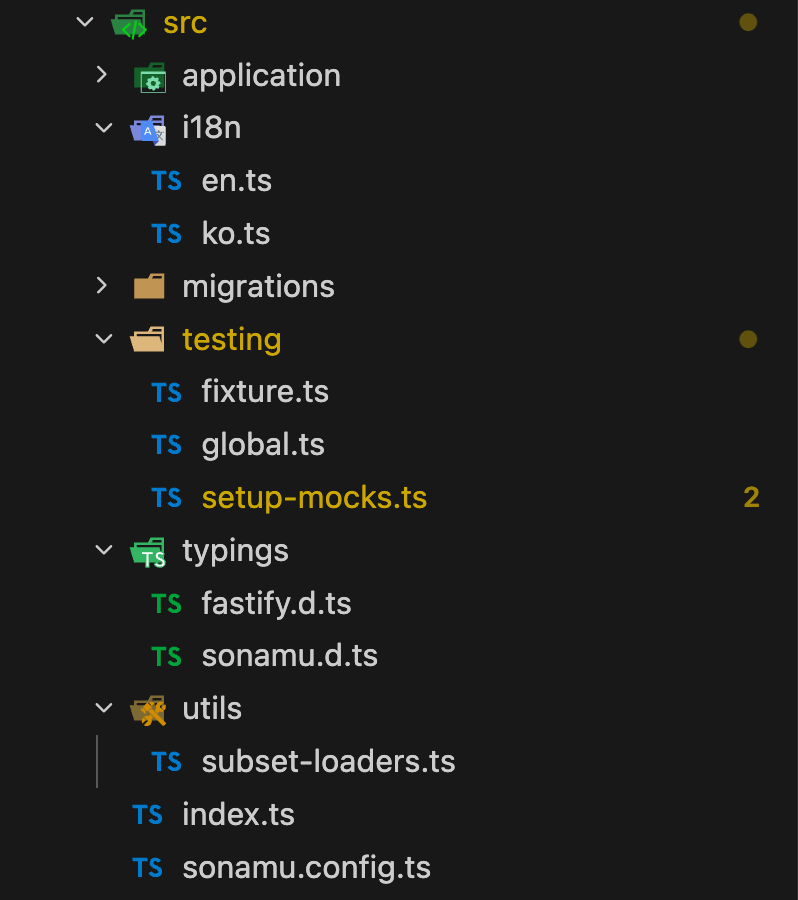
packages/api/src directory structure (with application folder expanded)
Entity File Creation ProcessFiles in the
application/{entity}/ folder are created when you create an entity through Sonamu UI and scaffold:- .entity.json: Auto-generated when defining entity in Sonamu UI
- .model.ts: Generated via
pnpm scaffold modelor Sonamu UI’s Scaffolding tab - .types.ts: Auto-generated when saving entity
- .model.test.ts: Generated via
pnpm scaffold model_testor Sonamu UI’s Scaffolding tab (optional)
application/ folder is empty. The folder is created when you create your first entity.Key Directory Descriptions
Key Directory Descriptions
application/
- Auto-created when creating the first entity
- Separate directory for each entity
- Example:
Userentity →application/user/directory
- Entity definition file
- Created in Sonamu UI
- Source of database schema
- Business logic implementation
- API endpoint definitions (
@apidecorator) - File you write directly
- TypeScript type definitions
- Zod validation schemas
- Auto-generated but extensible
- Shared with frontend
- Auto-generated Base schemas for all entities
- Enum types and label definitions
- Do not modify directly
- Internationalization translation files
ko.ts: Korean,en.ts: Englishsd.generated.tsis auto-generated when adding entities
- DB migration files generated by Sonamu UI
- Run with
pnpm sonamu migrate run
- Vitest test environment configuration
global.ts: Usesexport { setup } from "sonamu/test"pattern- Fixture data management
Learn More - Entity Files - Defining Entities -
How to write entity.json - Creating Models - model.ts
writing guide - Type System - Understanding types.ts
- What Gets Generated - Which files are auto-generated - Writing Tests - Test file structure
database/ Directory
Key File Descriptions
Key File Descriptions
docker-compose.yml
- PostgreSQL + pgvector image
- Container name, port, environment variable configuration
- Run with
pnpm docker:up
- Database initialization shell script
- Installs pgvector extension and creates databases
- Creates databases using environment variables (
DATABASE_NAME,_fixture,_test) - Auto-generated when running
pnpm create sonamu
- SQL files generated by
pnpm dumpcommand - Data backup storage
dump.sh: Backs up current DB data to dumps/seed.sh: Restores data from dumps/ to DB
Learn More - Configuration Files - sonamu.config.ts
Settings - Overall project configuration -
Database Configuration - DB connection and settings -
Server Configuration - Fastify server settings -
TypeScript Configuration - Compiler options -
Environment Variables - .env file management
Web Directory (Frontend)
Root Files
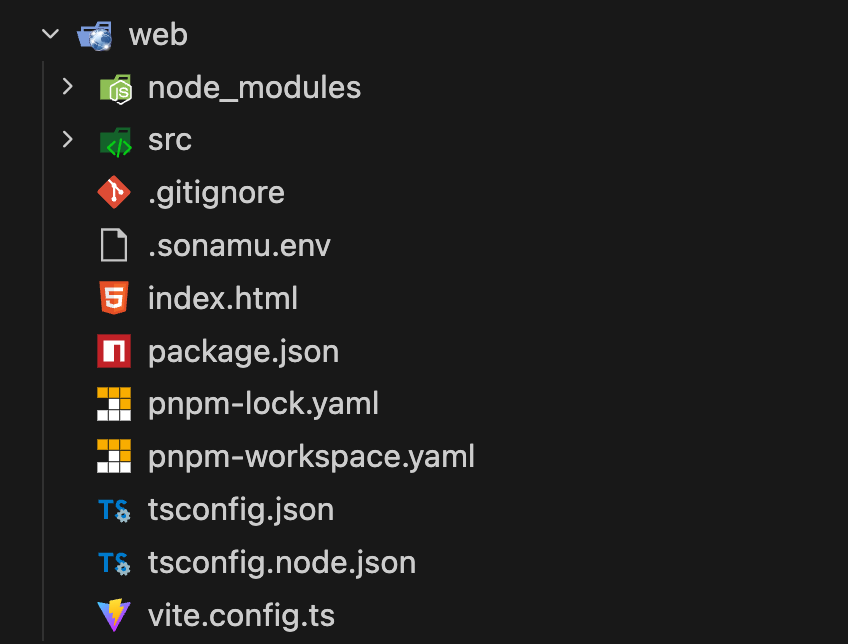
Actual file structure of packages/web directory
Key File Descriptions
Key File Descriptions
vite.config.ts
- Vite development server configuration
- TanStack Router, Tailwind CSS v4, unplugin-icons plugins
- API proxy settings (
/api→http://localhost:34900) - SSR configuration included
- Tailwind CSS v4 configuration
- API server connection information
API_HOST,API_PORTsettings
src/ Directory
Key Directory Descriptions
Key Directory Descriptions
routes/
- TanStack Router based file system routing
__root.tsx: Global layout- Filenames map to URL paths
- Service layer for communicating with the API server
- Auto-generated for each entity
- TanStack Query integration support
- React Context Providers
- SonamuContext: Global state management
- Frontend internationalization translation files
- Synchronized with API’s i18n
- Reusable common components
- Debugging tools like ApiLogViewer
Learn More - Frontend - How Services
Work - Auto-generation mechanism -
Using Services - How to call APIs -
Shared Types - Backend-frontend type
synchronization
Example File Structure After Creating an Entity
When you create a User entity, the following structure is created: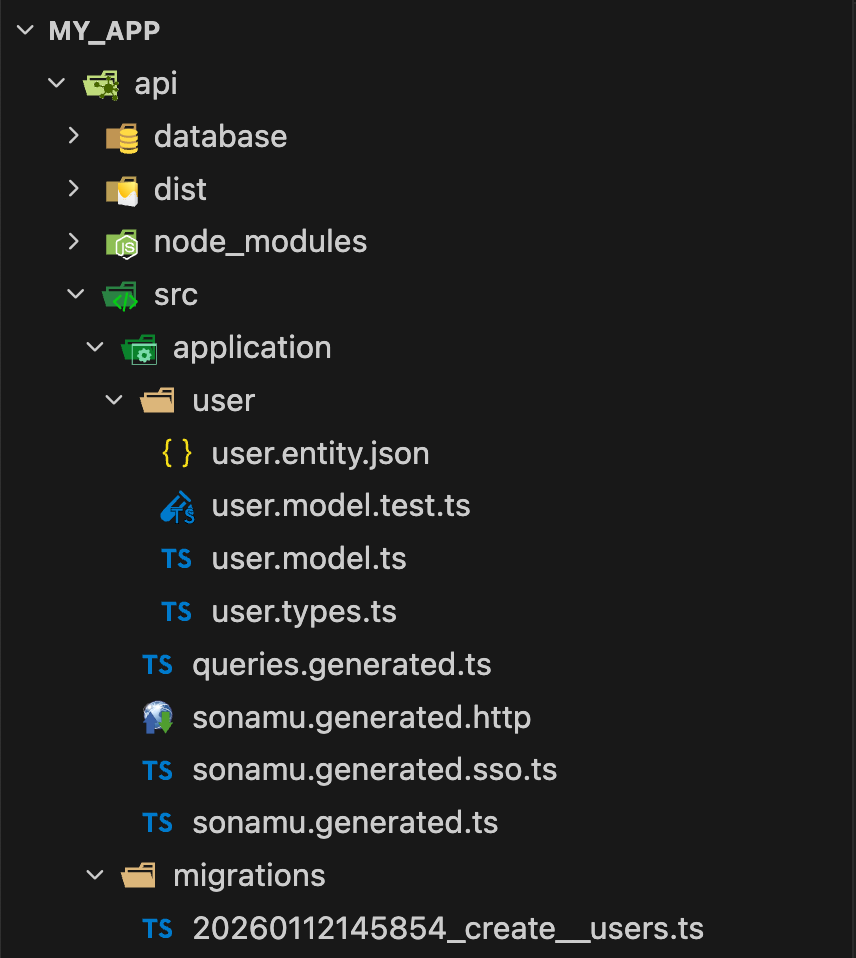
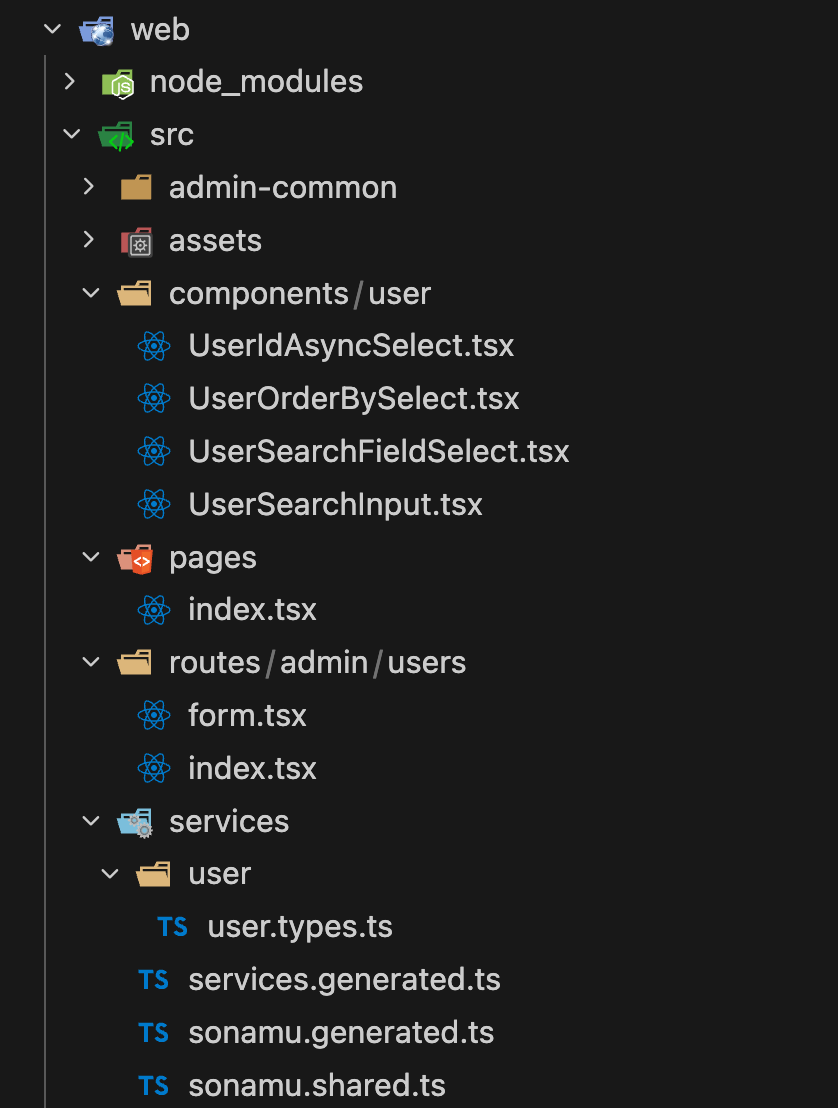
Actual file structure of packages/api/src/application/user folder after creating User entity
Role of Each File
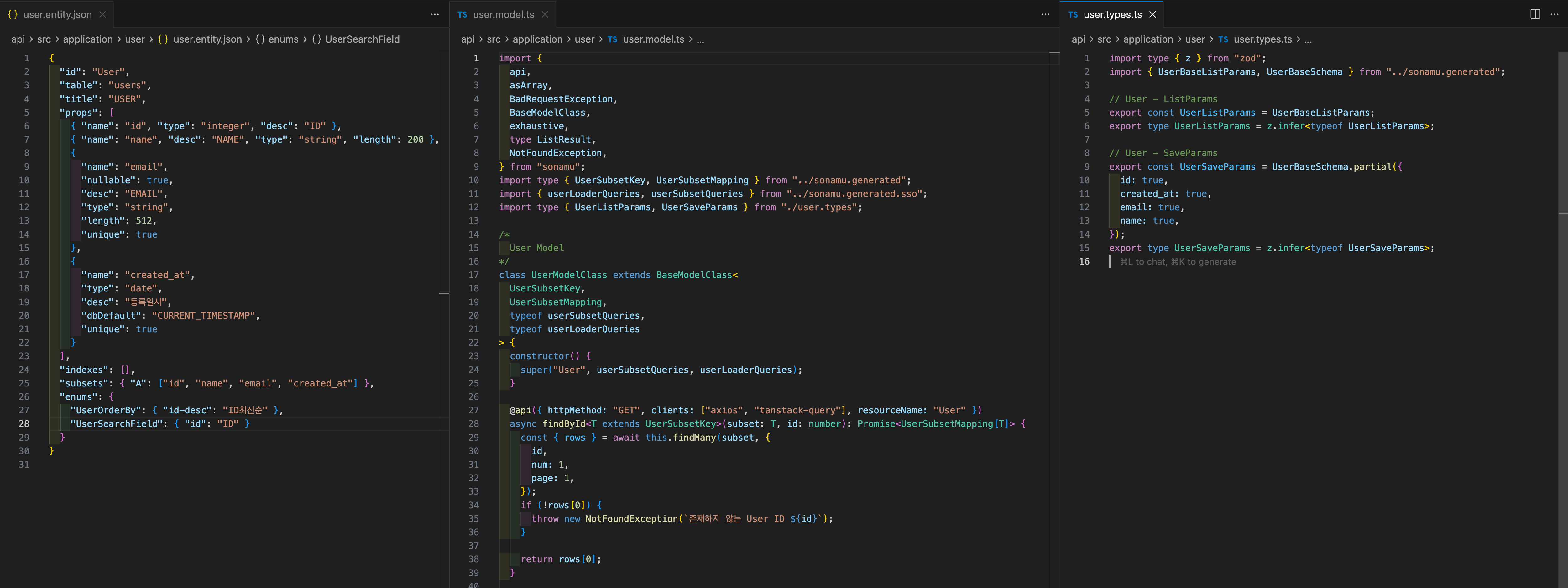
VS Code screen with user.entity.json, user.model.ts, user.types.ts files open side by side (split view)
Auto-generated vs Manually Written -
.entity.json: Written in Sonamu UI - .model.ts:
Manually written - .types.ts: Auto-generated but extensible - sonamu.generated.ts:
Auto-generated - do not modify - {entity}.service.ts: Auto-generated - do not modifyLearn More - Per-File Guides - Defining Entities
- How to write entity.json - @api Decorator - Defining APIs in model.ts - Entity Types - Using types.ts - Generated Types - Understanding sonamu.generated.ts
Key Work Locations During Development
Next Steps
Now that you understand the project structure, create your first entity:Creating Your First Entity
Use Sonamu UI to create your first entity and define the database schema.
Development Workflow
Understand Sonamu’s complete development cycle and learn how to work efficiently.