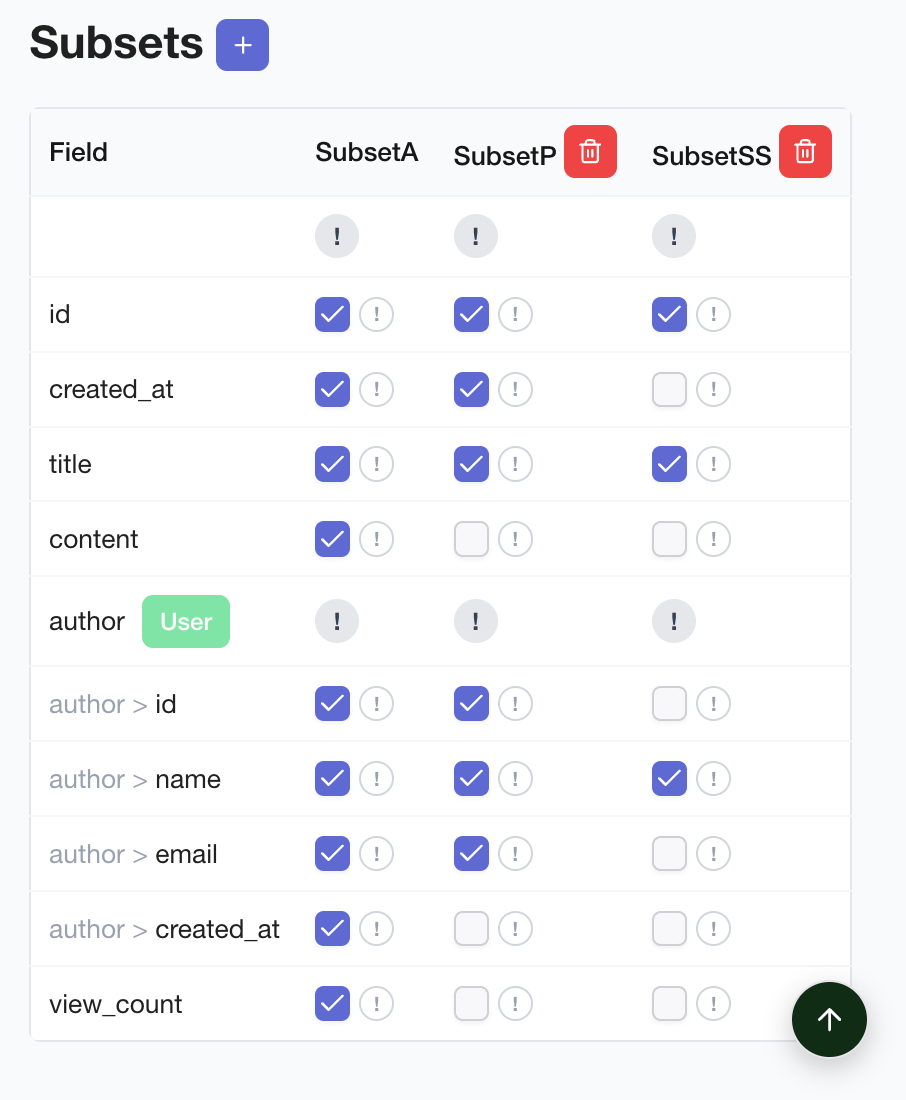
Subset is a feature that pre-defines specific field combinations of an Entity to efficiently manage API responses. You can visually define and edit Subsets in the Entity tab of Sonamu UI.
Subsets are not managed in a separate tab. They are managed in the Subsets sheet within the Entity tab. After selecting an Entity, you work in the Subsets sheet alongside Properties, Indexes, Relations, and Enums.
What is a Subset?
A Subset is a predefined field group that selectively retrieves only some fields of an Entity.
Why Use Subsets
| Problem | Subset Solution |
|---|
| Unnecessary data transfer | Select only needed fields |
| Inconsistent responses | Standardized field combinations |
| Complex JOINs | Control relationship data inclusion |
| Performance degradation | Query minimum data only |
Example
// ❌ Query all fields (inefficient)
const users = await UserModel.findMany();
// ✅ Query only needed fields with Subset
const users = await UserModel.findMany({ subset: "A" });
// → Returns only id, email, name
Subset Management Screen
Accessing from Entity Tab
To manage Subsets in Sonamu UI:
- Click the Entity tab
- Select the desired Entity from the left sidebar
- Click Subsets among the sheet tabs at the top
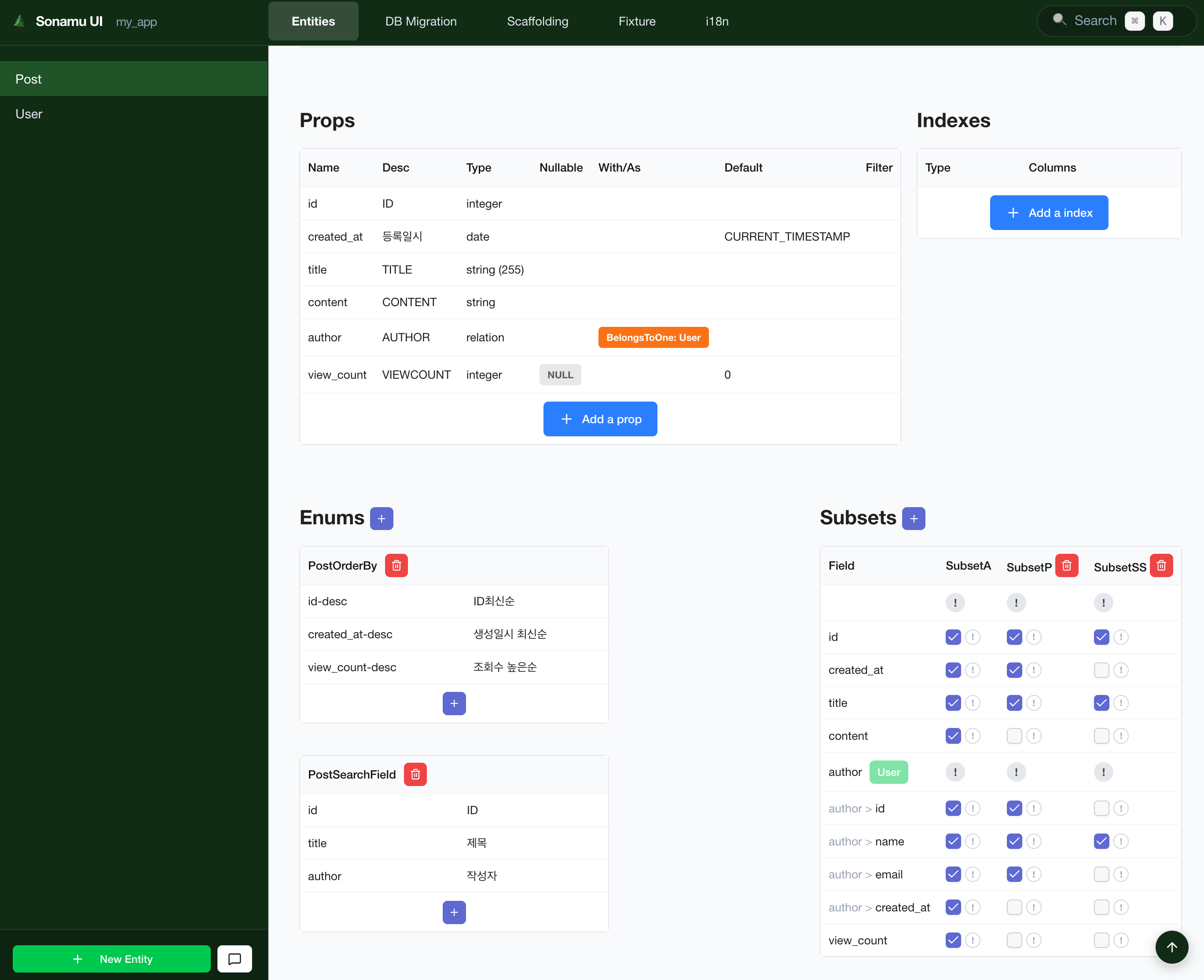
Screen Layout
The Subsets sheet is organized as follows:
- Left Sidebar: Entity list (showing currently selected Entity)
- Top Sheet Tabs: Properties, Indexes, Relations, Enums, Subsets
- Subset List: All Subsets of the current Entity (A, B, C, etc.)
- Field Selection Area: Checkboxes for fields to include in the selected Subset
Creating a Subset
1. Navigate to Entity Tab
Click the Entity tab in Sonamu UI.
2. Select Entity
Select the Entity to add a Subset to from the left sidebar.
3. Open Subsets Sheet
Click Subsets among the sheet tabs at the top.
4. Add Subset
Click the [Add Subset] button to create a new Subset.
| Field | Description | Example |
|---|
| Subset ID | Subset identifier (A-Z) | A, B, C |
| Description | Subset description | For list, For detail |
Subset IDs typically use single alphabet letters (A, B, C…).
5. Select Fields
Select the fields to include in the created Subset:
Basic fields:
☑ id ← Required (always included)
☑ email
☑ name
□ password ← Exclude sensitive info
□ bio
☑ created_at
Relation fields:
☐ posts → Post.Subset A
☐ profile → Profile.Subset B
Subset Types
Subset A (Basic List)
Purpose: Used for list queries
Includes: Required info + summary info
// User.Subset A
{
id: true,
email: true,
name: true,
created_at: true,
}
Usage example:
// User list
const users = await UserModel.findMany({ subset: "A" });
Subset B (Detail View)
Purpose: Single record detail query
Includes: All general info (excluding sensitive info)
// User.Subset B
{
id: true,
email: true,
name: true,
bio: true,
profile_image: true,
created_at: true,
updated_at: true,
}
Usage example:
// User detail
const user = await UserModel.findById(1, { subset: "B" });
Subset C (With Relations)
Purpose: Query including related data
Includes: Basic info + related Entities
// Post.Subset C
{
id: true,
title: true,
content: true,
author: "User.B", // Include User's Subset B
comments: "Comment.A", // Include Comment's Subset A
created_at: true,
}
Usage example:
// Post + author + comments
const post = await PostModel.findById(1, { subset: "C" });
Relation Field Settings
belongsTo Relation
Example: Post → User (author)
When selected, querying Post also fetches author (User) info:
// Result
{
id: 1,
title: "Hello World",
author: {
id: 10,
email: "user@example.com",
name: "John Doe",
// Rest of User.Subset B fields...
}
}
hasMany Relation
Example: User → Post[] (authored posts list)
When selected, querying User also fetches authored Post list:
// Result
{
id: 10,
email: "user@example.com",
name: "John Doe",
posts: [
{ id: 1, title: "First Post", ... },
{ id: 2, title: "Second Post", ... },
]
}
N+1 problem caution: Including hasMany relations in Subsets may cause additional queries.
Only include when necessary.
Editing Subsets
Add/Remove Fields
- Navigate to the Entity’s Subsets sheet in the Entity tab
- Select the Subset to edit
- Click field checkboxes to change inclusion/exclusion
- Click [Save] button
Changes applied immediately:
Before: { id, email, name }
After: { id, email, name, bio, created_at }
Delete Subset
- Navigate to the Entity’s Subsets sheet in the Entity tab
- Select the Subset to delete
- Click [Delete] button
- Click [Confirm] in the confirmation modal
Deleting used Subset: If there are APIs using the Subset you’re deleting, errors may occur.
Practical Examples
User Management System
// User Entity Subsets
// Subset A: For list (minimal info)
{
id: true,
email: true,
name: true,
role: true,
is_active: true,
}
// Subset B: For detail (full info, excluding sensitive)
{
id: true,
email: true,
name: true,
role: true,
bio: true,
profile_image: true,
phone: true,
is_active: true,
created_at: true,
updated_at: true,
}
// Subset C: For admin (all info)
{
...Subset B,
last_login_at: true,
login_count: true,
ip_address: true,
}
Blog System
// Post Entity Subsets
// Subset A: For list (summary)
{
id: true,
title: true,
excerpt: true,
author: "User.A",
view_count: true,
created_at: true,
}
// Subset B: For detail (full content)
{
id: true,
title: true,
content: true,
author: "User.B",
category: "Category.A",
tags: "Tag.A",
view_count: true,
created_at: true,
updated_at: true,
}
// Subset C: With comments
{
...Subset B,
comments: "Comment.A",
}
Using in Models
Once Subsets are defined, they can be automatically used in Model APIs.
Using in findMany
class UserModelClass extends BaseModelClass {
@api({ httpMethod: "GET" })
async findMany(params: ListParams<User>) {
const { qb } = this.getSubsetQueries("A");
return this.executeSubsetQuery({
subset: "A",
qb,
params,
});
}
}
Using in findById
class UserModelClass extends BaseModelClass {
@api({ httpMethod: "GET" })
async findById(id: number) {
const { qb } = this.getSubsetQueries("B");
qb.where("id", id);
return this.executeSubsetQuery({
subset: "B",
qb,
params: { num: 1, page: 1 },
}).then(result => result.rows[0]);
}
}
Select Only Needed Fields
// ❌ Query all fields (slow)
SELECT * FROM users
// ✅ Use Subset A (fast)
SELECT id, email, name FROM users
Minimize Relation Loading
// ❌ Include unnecessary relations
{
posts: "Post.C", // Loads all Post relations too
}
// ✅ Only needed relations
{
posts: "Post.A", // Only basic Post info
}
Next Steps